Jinayon Dashboard User Manual
Jinayon 后台管理系统使用手册
Version: client training manual, live dashboard screenshots, May 29, 2026.
This manual explains the completed Jinayon dashboard features that are currently available to the client. It does not describe deferred tools as active, and it does not include passwords, private server information, or raw inquiry records.
本手册用于帮助客户学习目前已经完成并可使用的 Jinayon 后台功能。未完成或仍需单独批准的功能不会被写成“已可用”。本手册不包含密码、服务器隐私信息或原始询盘记录。
Screenshot Index
截图目录
| Screenshot | English Caption | 中文说明 |
|---|---|---|
SS01_Login_Page_Fullscreen.png | Login page. | 登录页面。 |
SS02_Dashboard_Overview_Fullscreen.png | Dashboard overview. | 后台总览。 |
SS03_Inquiries_Inbox_Fullscreen.png | Sanitized inquiries inbox. | 已脱敏的询盘列表。 |
SS04_Inquiry_Detail_Status_Fullscreen.png | Sanitized inquiry detail and status workflow. | 已脱敏的询盘详情与状态流程。 |
SS05_Settings_Company_Info_Fullscreen.png | Company settings. | 公司信息设置。 |
SS06_Settings_Password_Security_Fullscreen.png | Password security and manager accounts. | 密码安全与经理账号。 |
SS07_Editors_Home_Fullscreen.png | Content editors home. | 内容编辑中心。 |
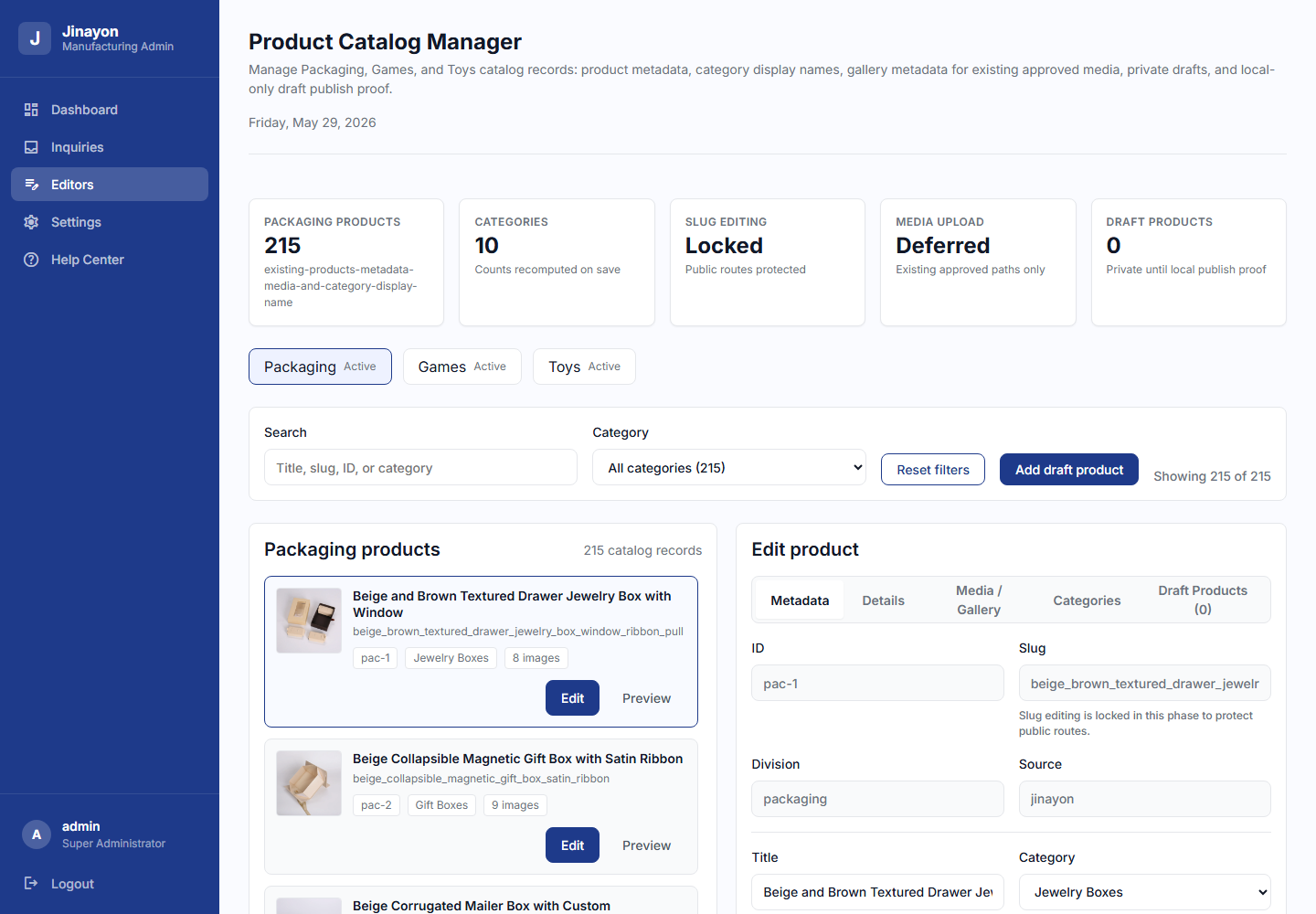
SS08_Product_Catalog_Manager_Overview_Fullscreen.png | Product Catalog Manager overview. | 产品目录管理总览。 |
SS09_Product_Metadata_Edit_Fullscreen.png | Product metadata editing. | 产品基础信息编辑。 |
SS10_Product_Media_Gallery_Fullscreen.png | Product media/gallery metadata. | 产品图片/图库元数据。 |
SS11_Product_Categories_Fullscreen.png | Product category display names. | 产品分类显示名称。 |
SS12_Draft_Product_Workflow_Fullscreen.png | Draft Product workflow. | 草稿产品流程。 |
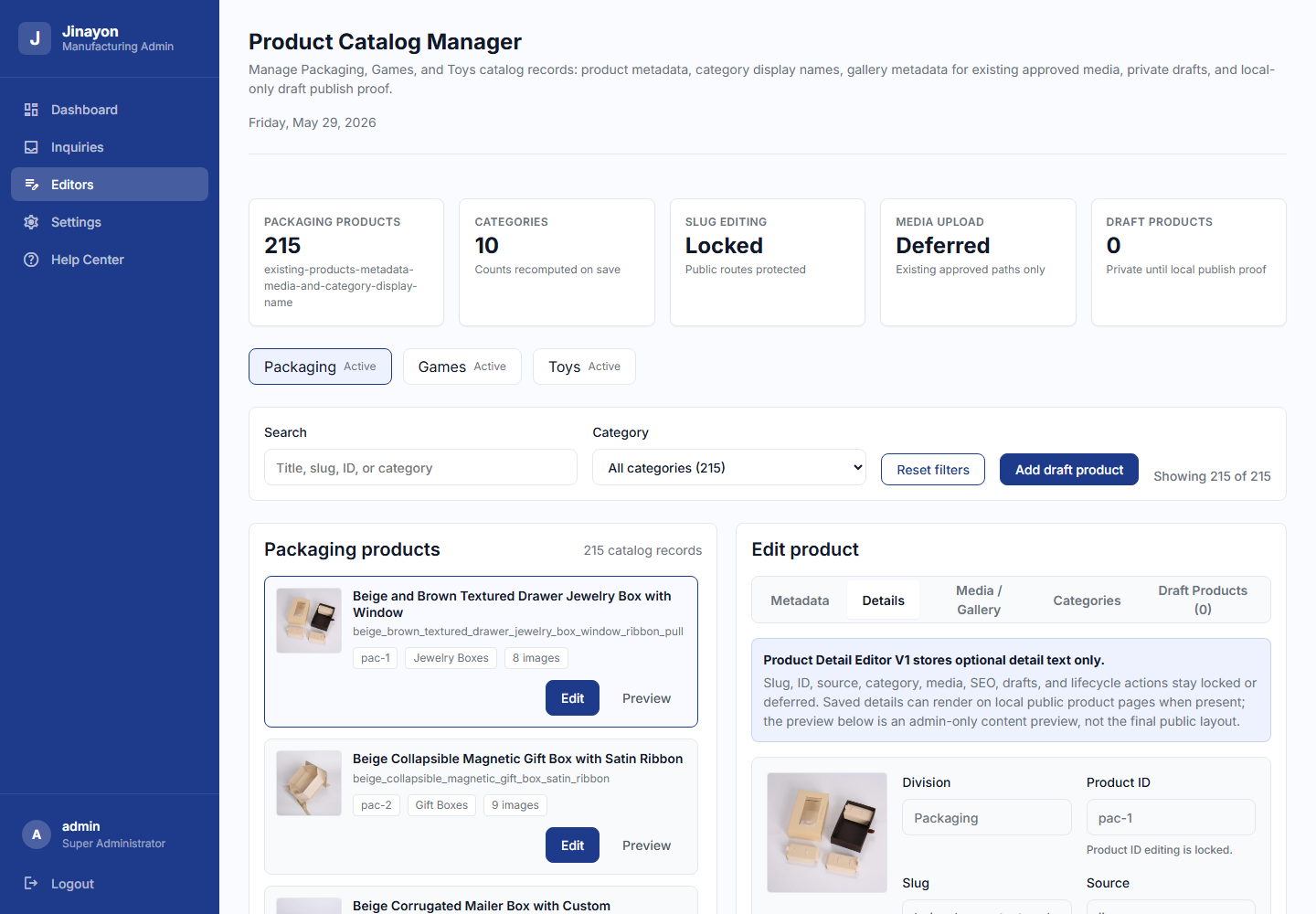
SS13_Product_Details_Tab_Fullscreen.png | Product Details editor. | 产品详情编辑器。 |
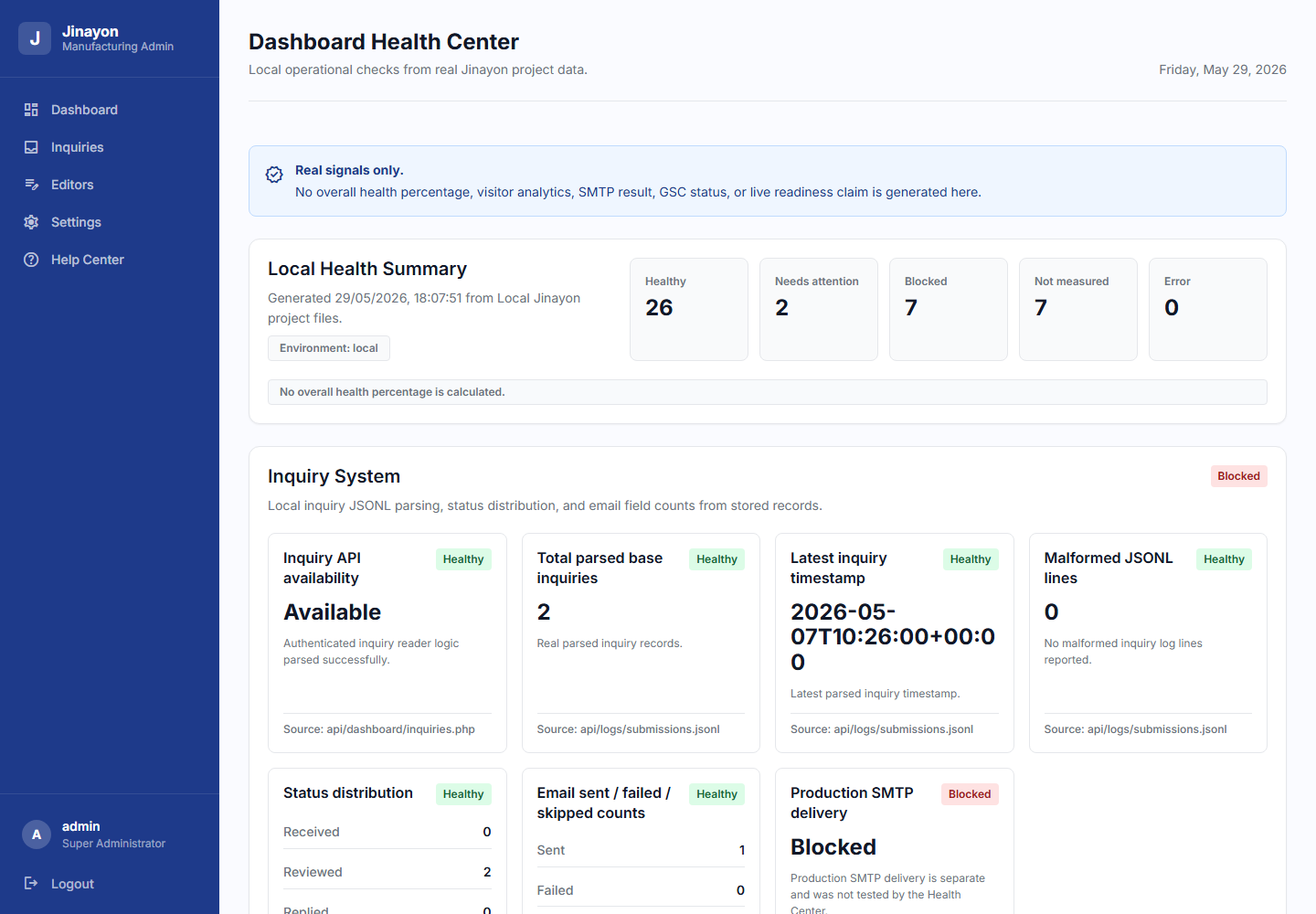
SS14_Dashboard_Health_Fullscreen.png | Dashboard Health. | 后台健康检查。 |
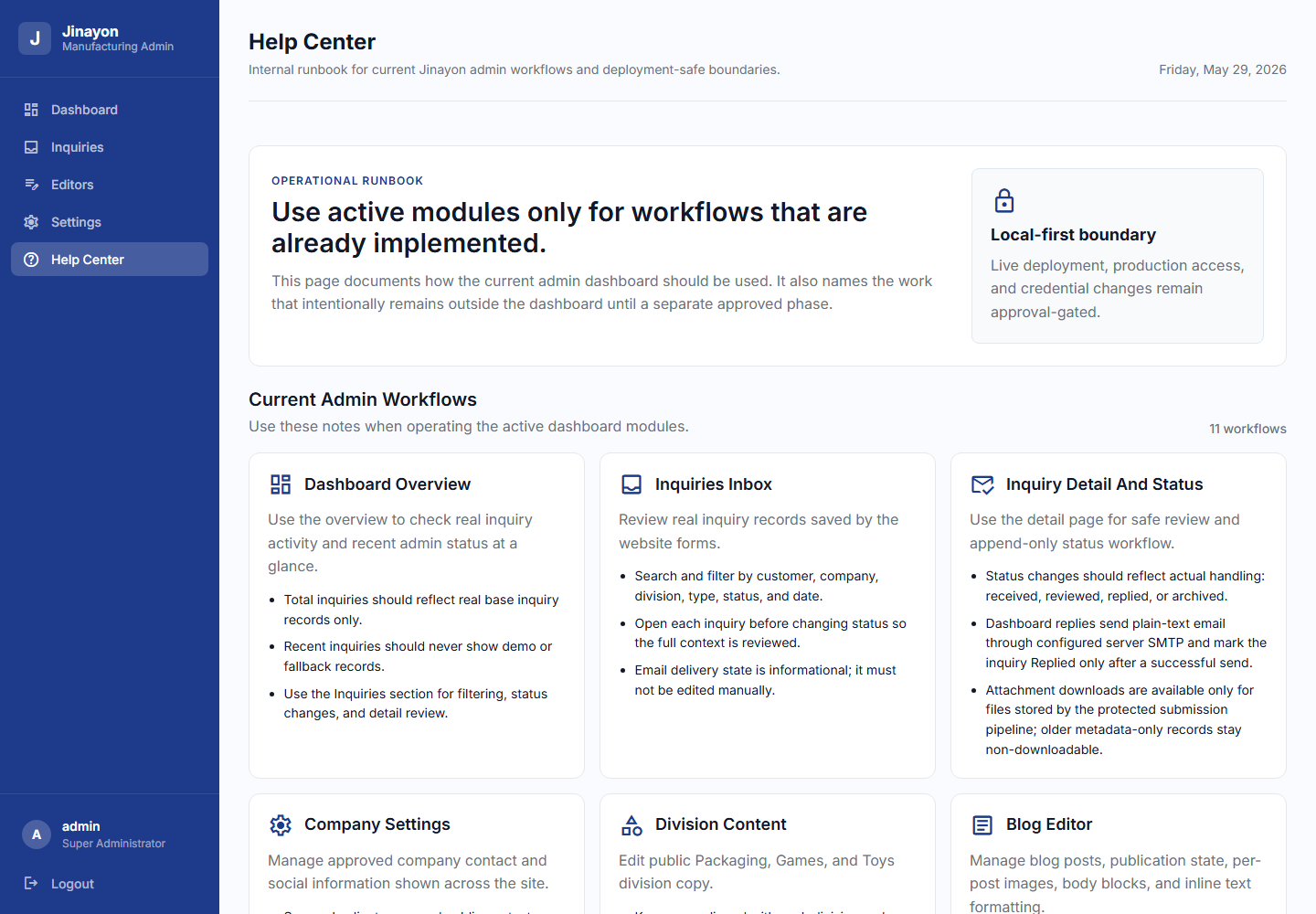
SS15_Help_Center_Fullscreen.png | Help Center. | 帮助中心。 |
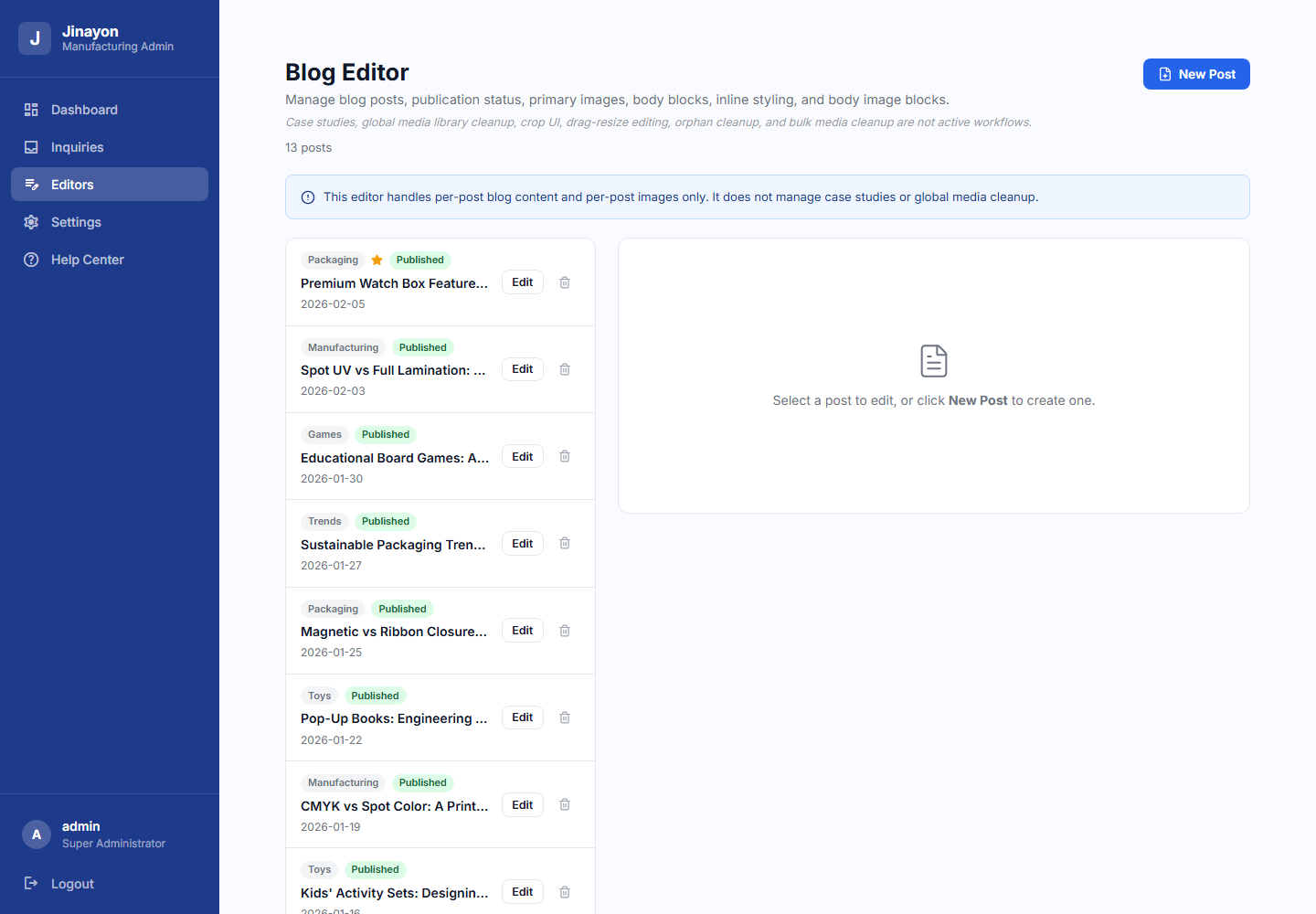
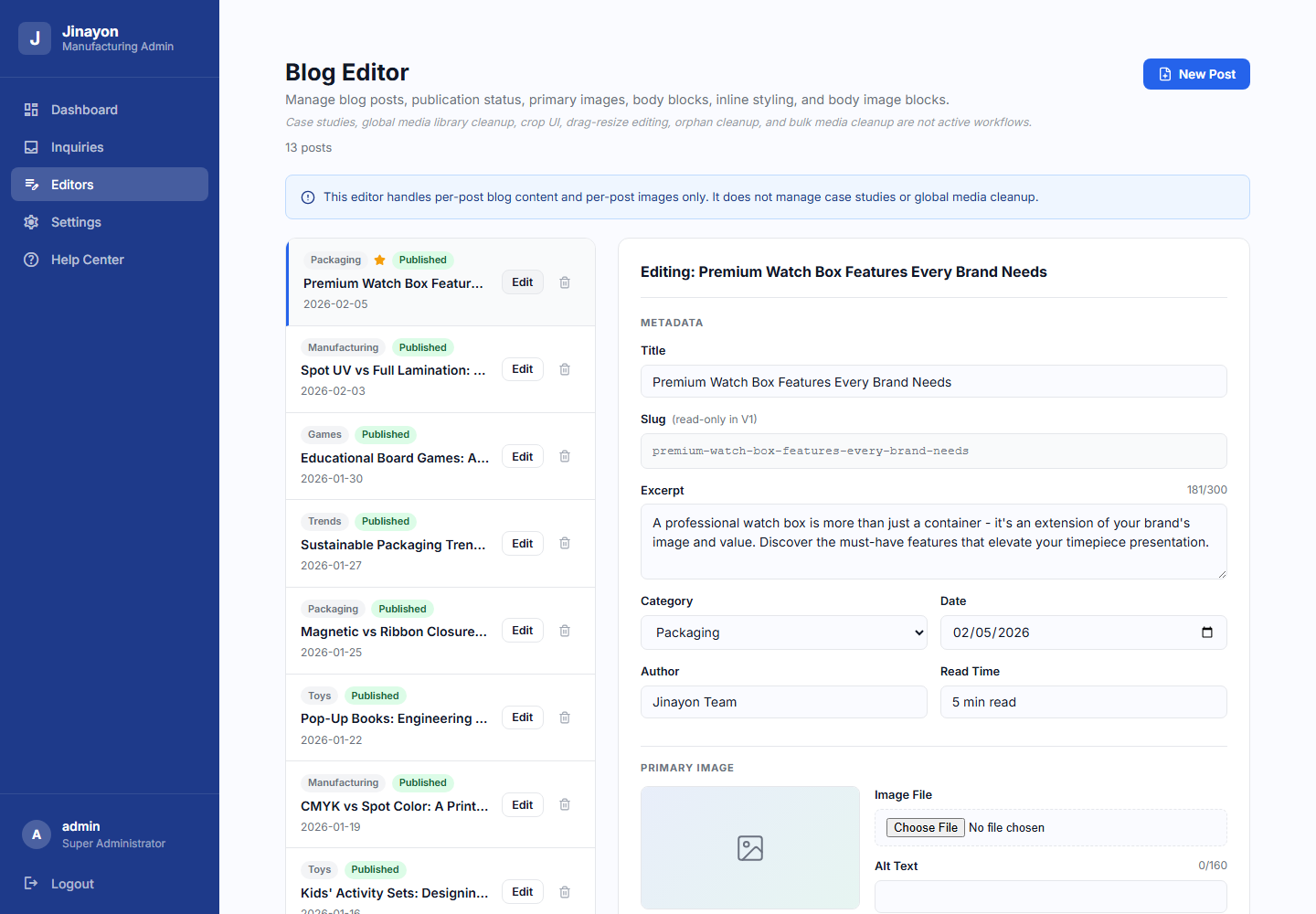
SS16_Blog_Editor_Fullscreen.png | Blog Editor. | 博客编辑器。 |
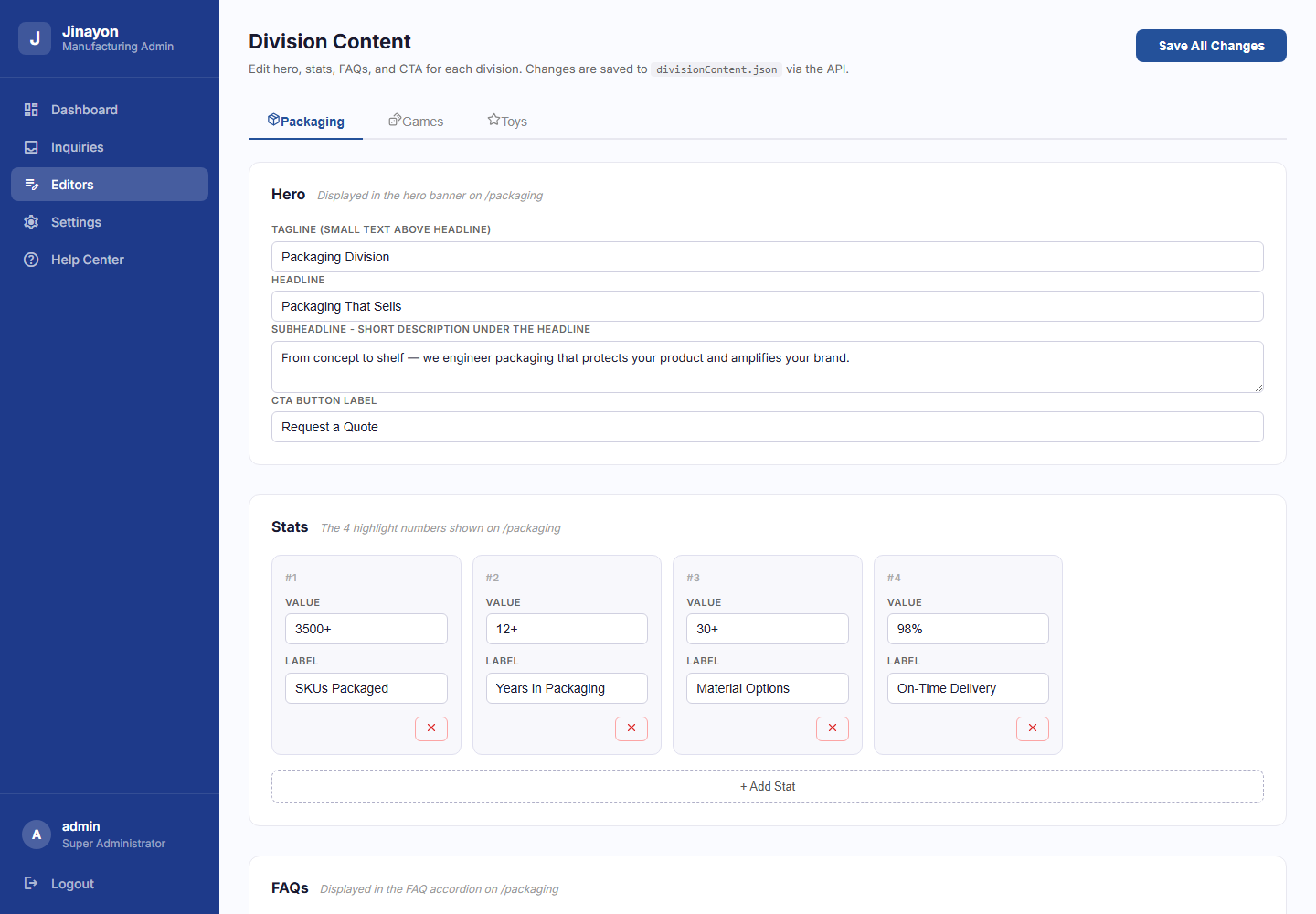
SS17_Division_Content_Editor_Fullscreen.png | Division Content Editor. | 事业部内容编辑。 |
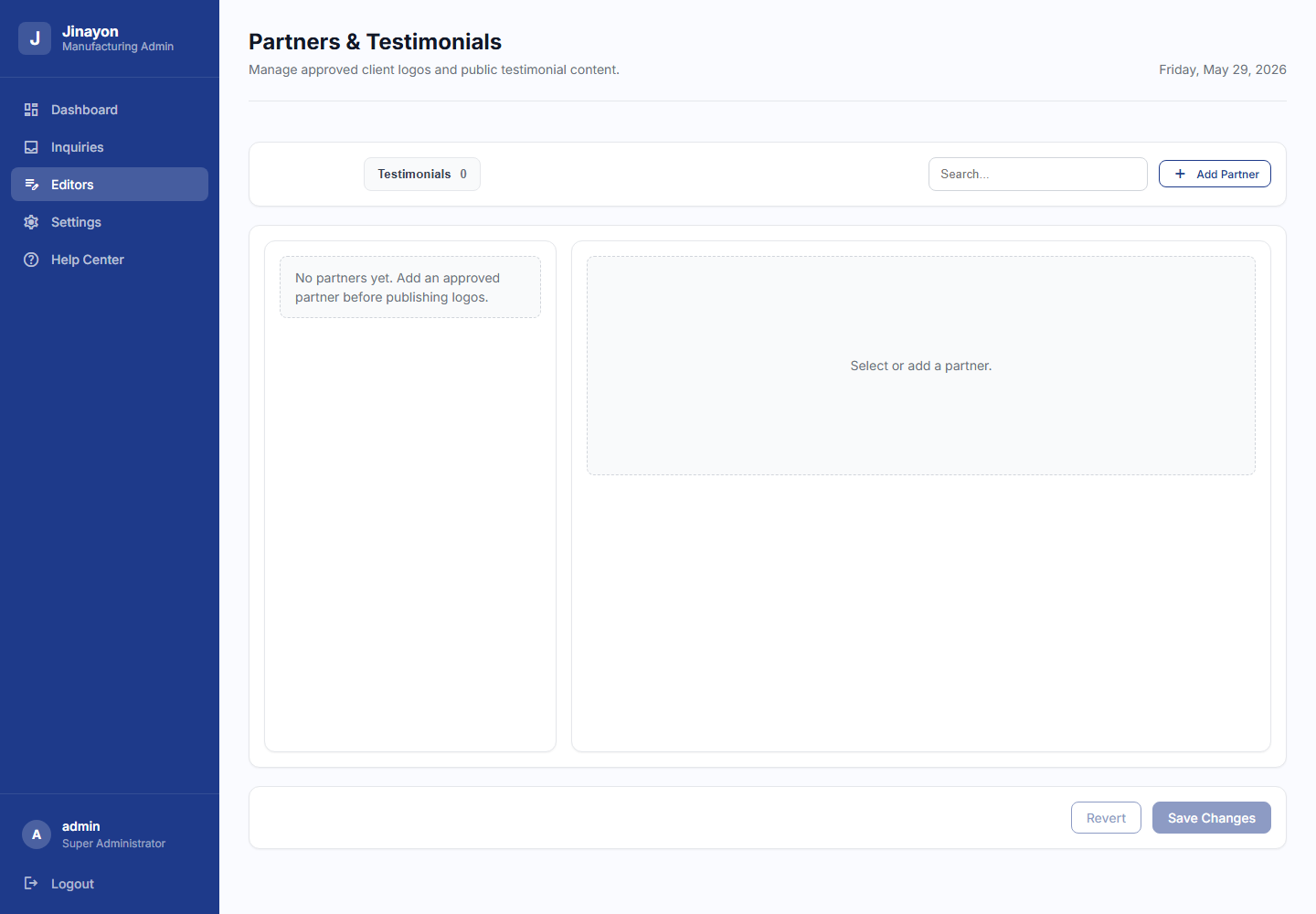
SS18_Partners_Testimonials_Fullscreen.png | Partners and Testimonials. | 合作伙伴与客户评价。 |
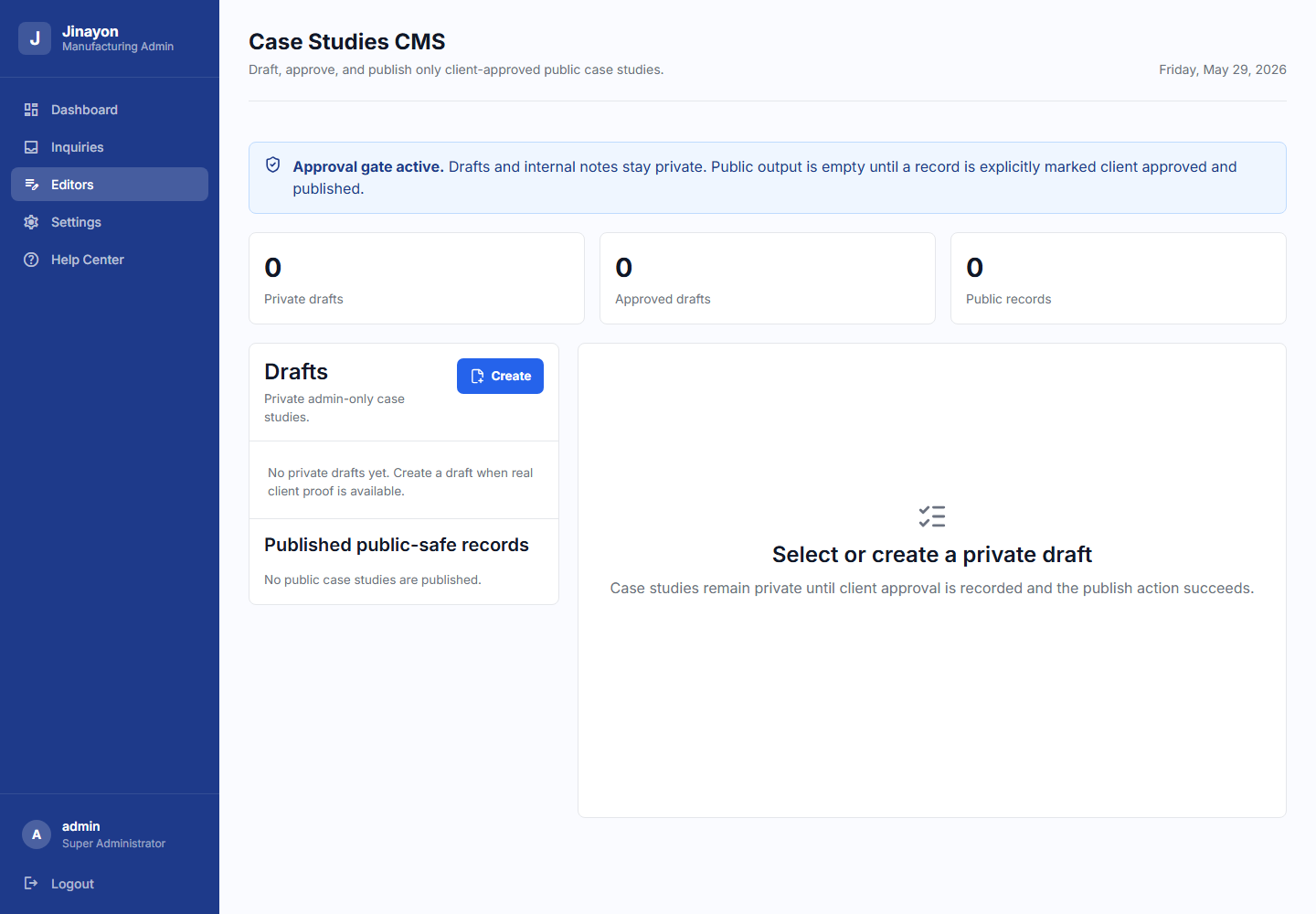
SS19_Case_Studies_API_Status_Or_Deferred_State_Fullscreen.png | Case Studies CMS. | 案例研究 CMS。 |
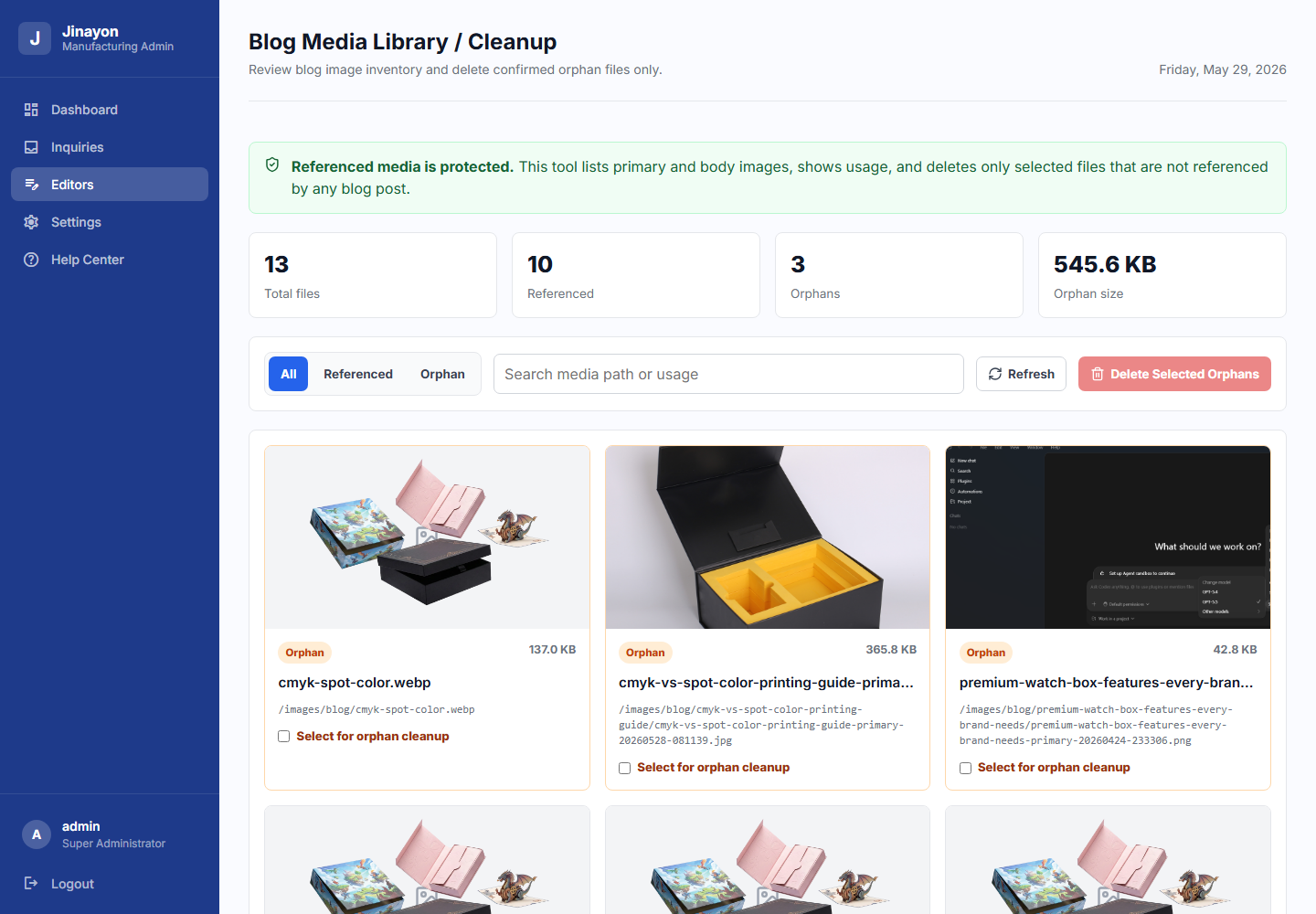
SS20_Blog_Media_Library_Fullscreen.png | Blog Media Library / Cleanup. | 博客图片库/清理工具。 |
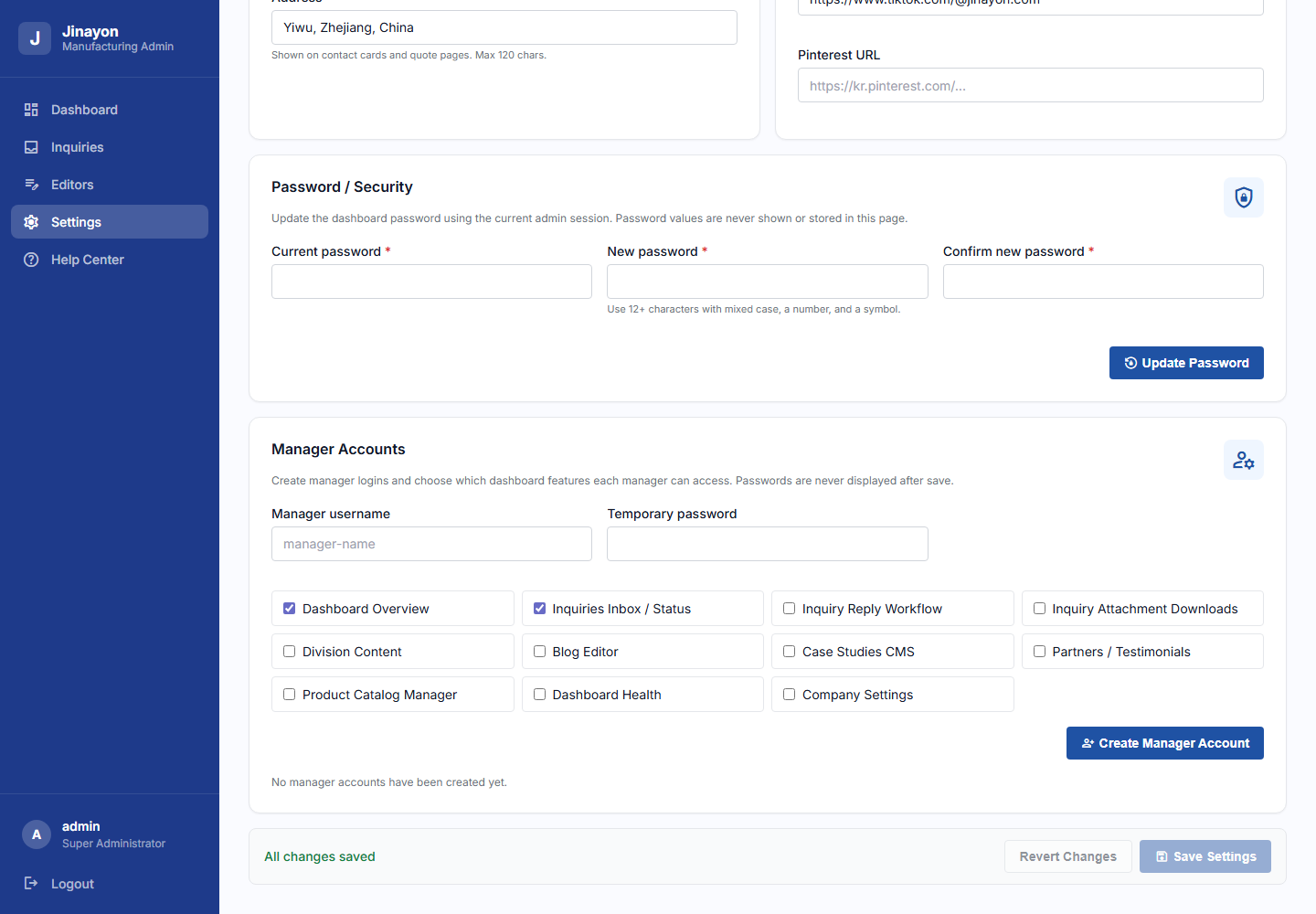
SS21_Manager_Accounts_Fullscreen.png | Manager account permissions. | 经理账号权限设置。 |
SS22_Inquiry_Reply_Attachments_Fullscreen.png | Inquiry reply and attachments boundary. | 询盘回复与附件边界。 |
SS23_Blog_Metadata_Primary_Image_Controls_Fullscreen.png | Blog metadata and primary image controls. | 博客元信息与主图控制。 |
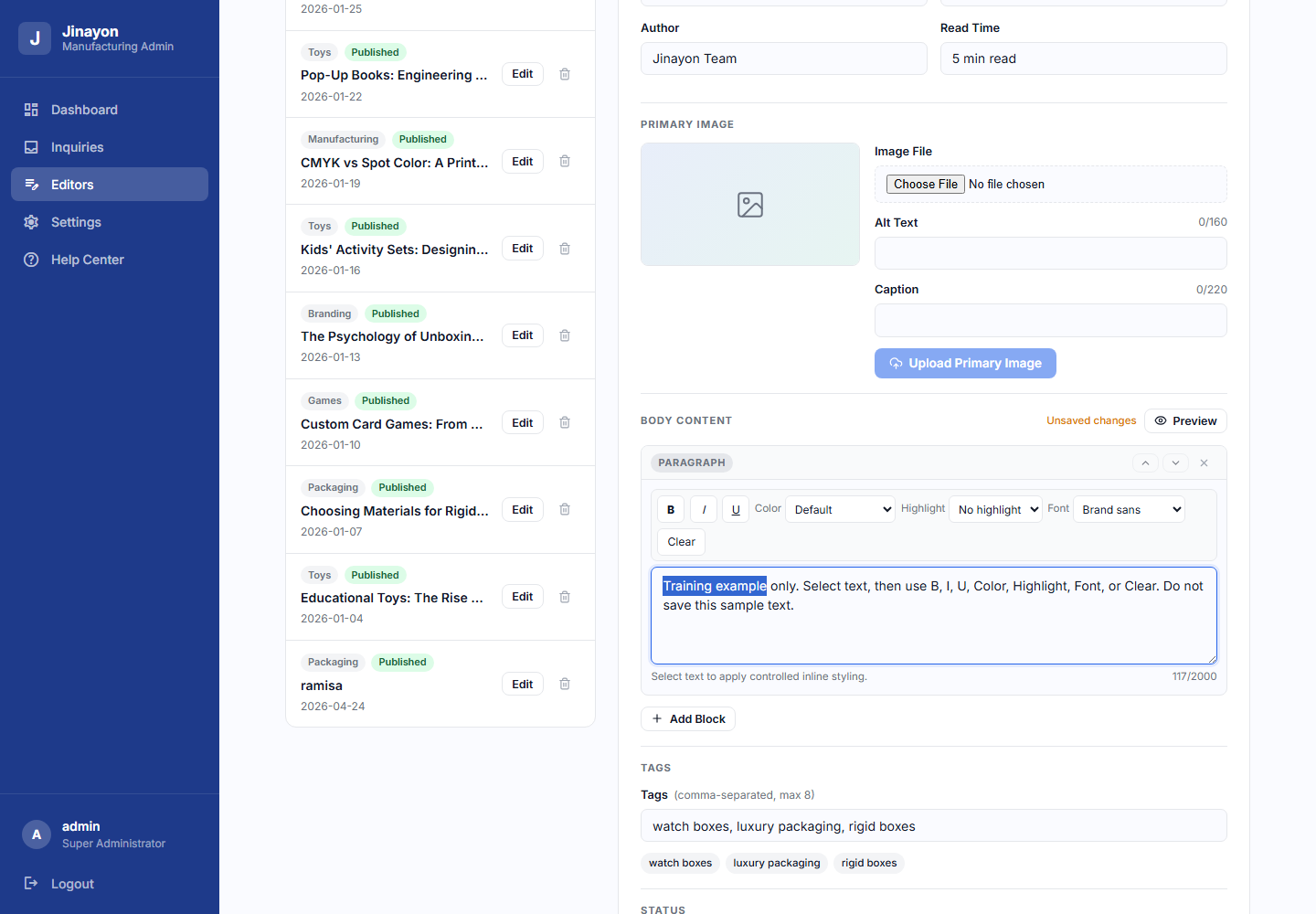
SS24_Blog_Body_Blocks_Inline_Formatting_Fullscreen.png | Blog body blocks and inline formatting controls. | 博客正文区块与行内格式工具。 |
SS25_Product_Details_Spec_And_Button_Controls_Fullscreen.png | Product Details specification and action controls. | 产品详情规格与操作按钮。 |
1. Introduction
1. 简介
English
The Jinayon dashboard is the controlled admin area for managing website content, products, inquiries, blog posts, case studies, company settings, and operational health checks.
Use the dashboard for normal content and product operations. Do not use it to invent customer claims, create fake case studies, publish fake testimonials, or make server-level changes. Some advanced tools remain intentionally deferred, including Backlinks, SEO Helper Tools, Sitemap / Robots Tools, and Google Search Console Helper.
中文
Jinayon 后台是一个受控的管理系统,用于管理网站内容、产品、询盘、博客、案例研究、公司信息设置以及后台健康检查。
请将后台用于日常内容和产品管理。不要用后台编造客户案例、虚假评价、虚假成果,或进行服务器级别操作。部分高级工具仍未开放,包括外链追踪、SEO 辅助工具、Sitemap/Robots 工具以及 Google Search Console 辅助工具。
2. Login And Dashboard Access
2. 登录与后台访问
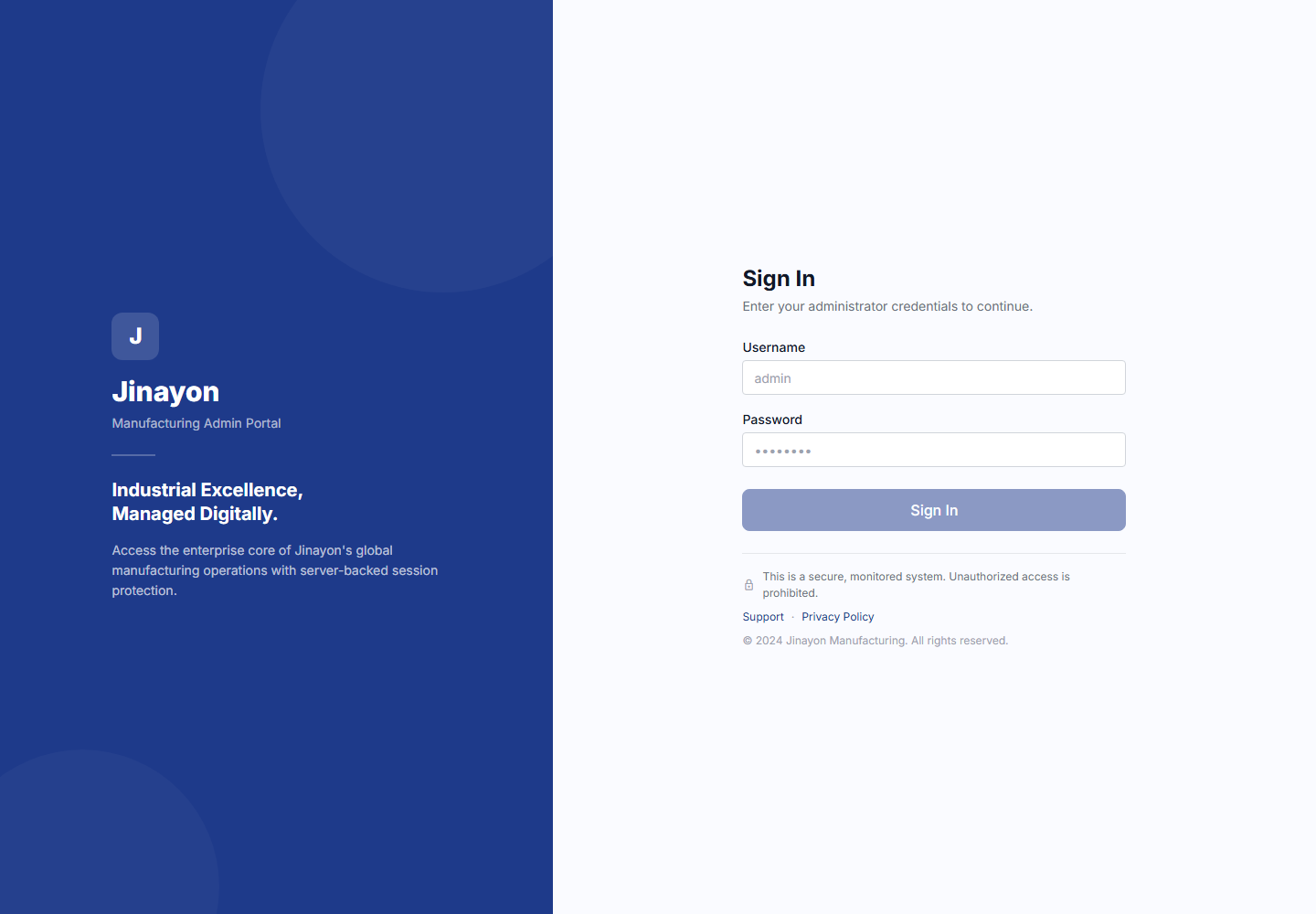
English
- Open the dashboard URL provided by the site owner.
- Enter your assigned username.
- Enter your password.
- Select Sign In.
- When finished, use Logout in the sidebar.
If login fails, check that the username and password are correct. If the account is locked, disabled, or forgotten, contact the primary administrator. Never share the dashboard password publicly or in chat screenshots.
中文
- 打开网站负责人提供的后台地址。
- 输入分配给你的用户名。
- 输入密码。
- 点击 Sign In 登录。
- 使用完后,在左侧菜单点击 Logout 退出。
如果登录失败,请先确认用户名和密码是否正确。如果账号被禁用、遗忘或无法登录,请联系主管理员。不要公开分享后台密码,也不要在聊天截图中显示密码。
3. Dashboard Overview
3. 仪表盘总览
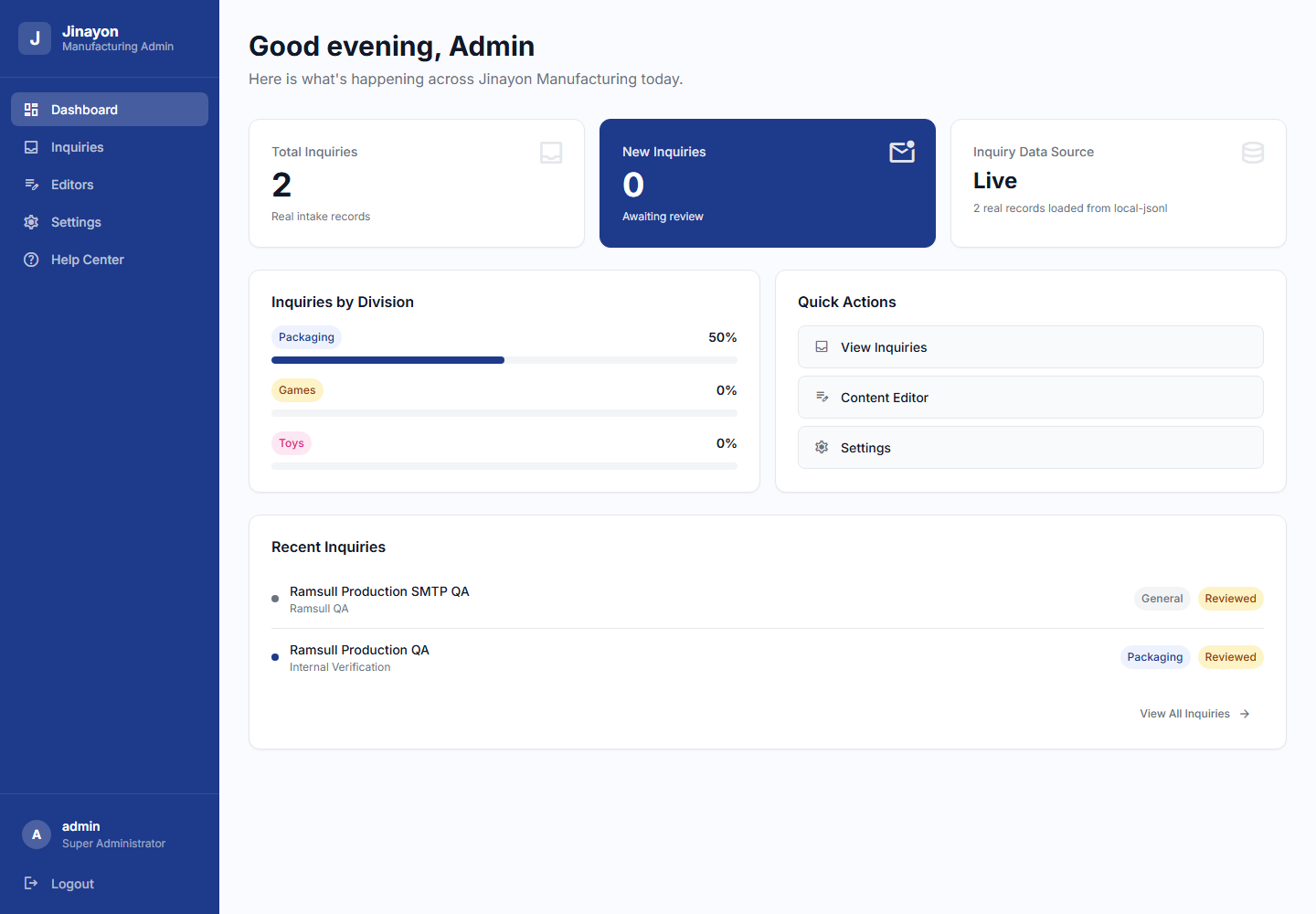
English
The overview page gives a quick operational snapshot. It helps the team see inquiry activity, editor shortcuts, product/content status, and health signals from real dashboard data.
Client should notice:
- The inquiry summary area.
- Quick links into active editors.
- Health/status cards based on real signals only.
The dashboard does not show fake analytics or fake readiness scores.
中文
总览页面用于快速查看后台运行状态。它帮助团队查看询盘情况、编辑入口、产品/内容状态以及基于真实数据的健康提示。
客户需要注意:
- 询盘摘要区域。
- 已开放编辑器的快捷入口。
- 基于真实信号的健康/状态卡片。
后台不会显示虚假分析数据,也不会显示虚假的完成度分数。
4. Inquiries
4. 询盘管理
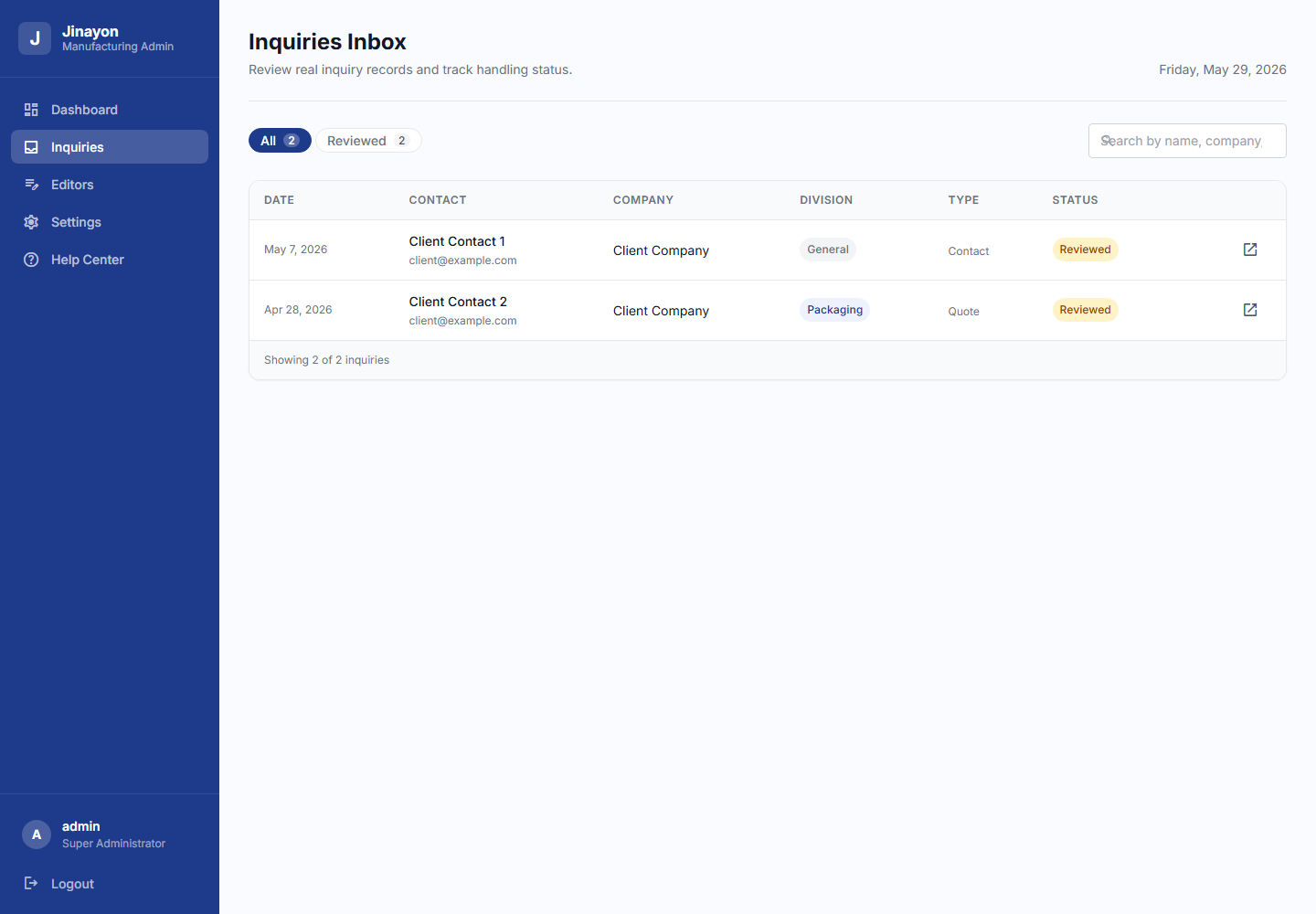
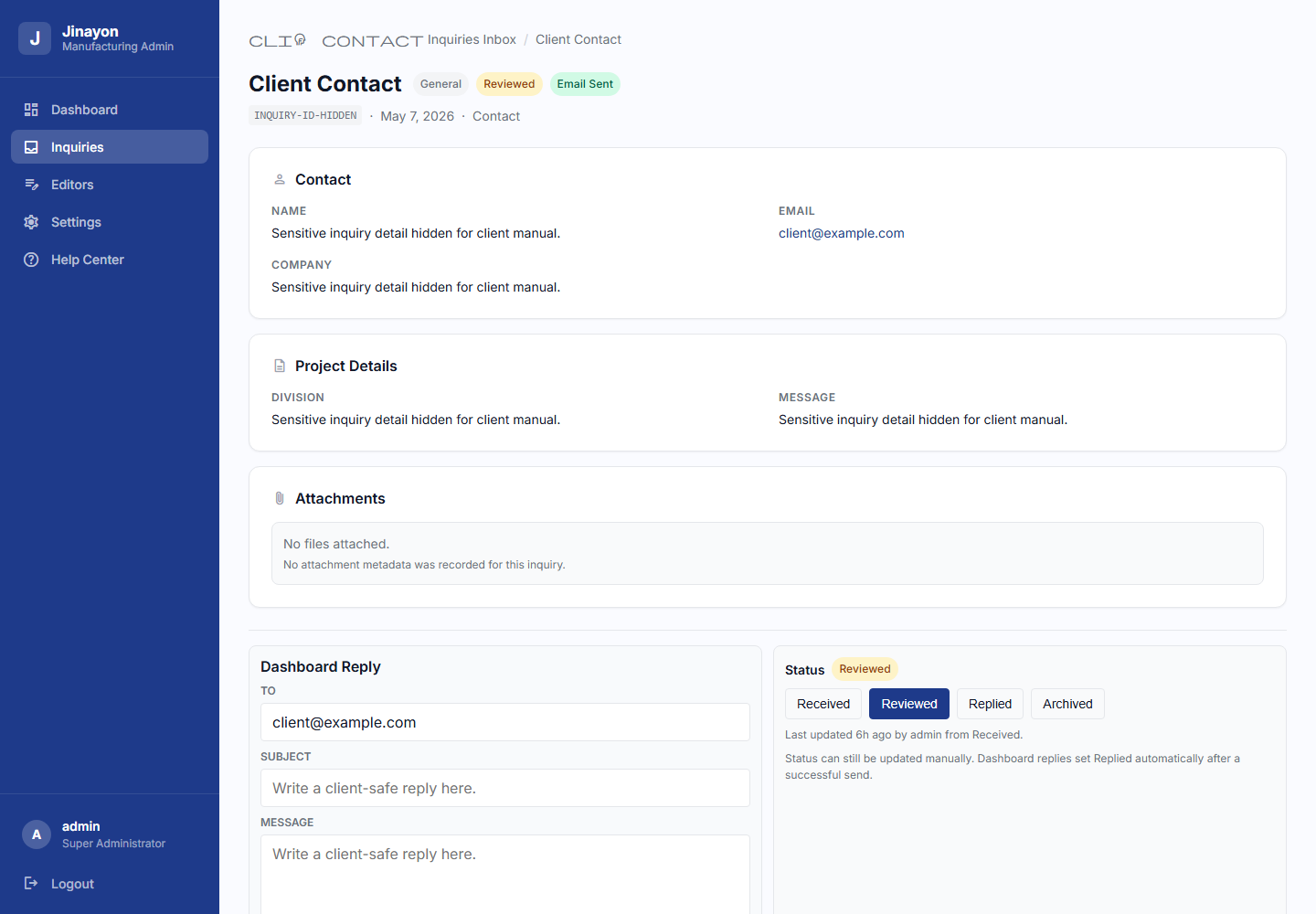
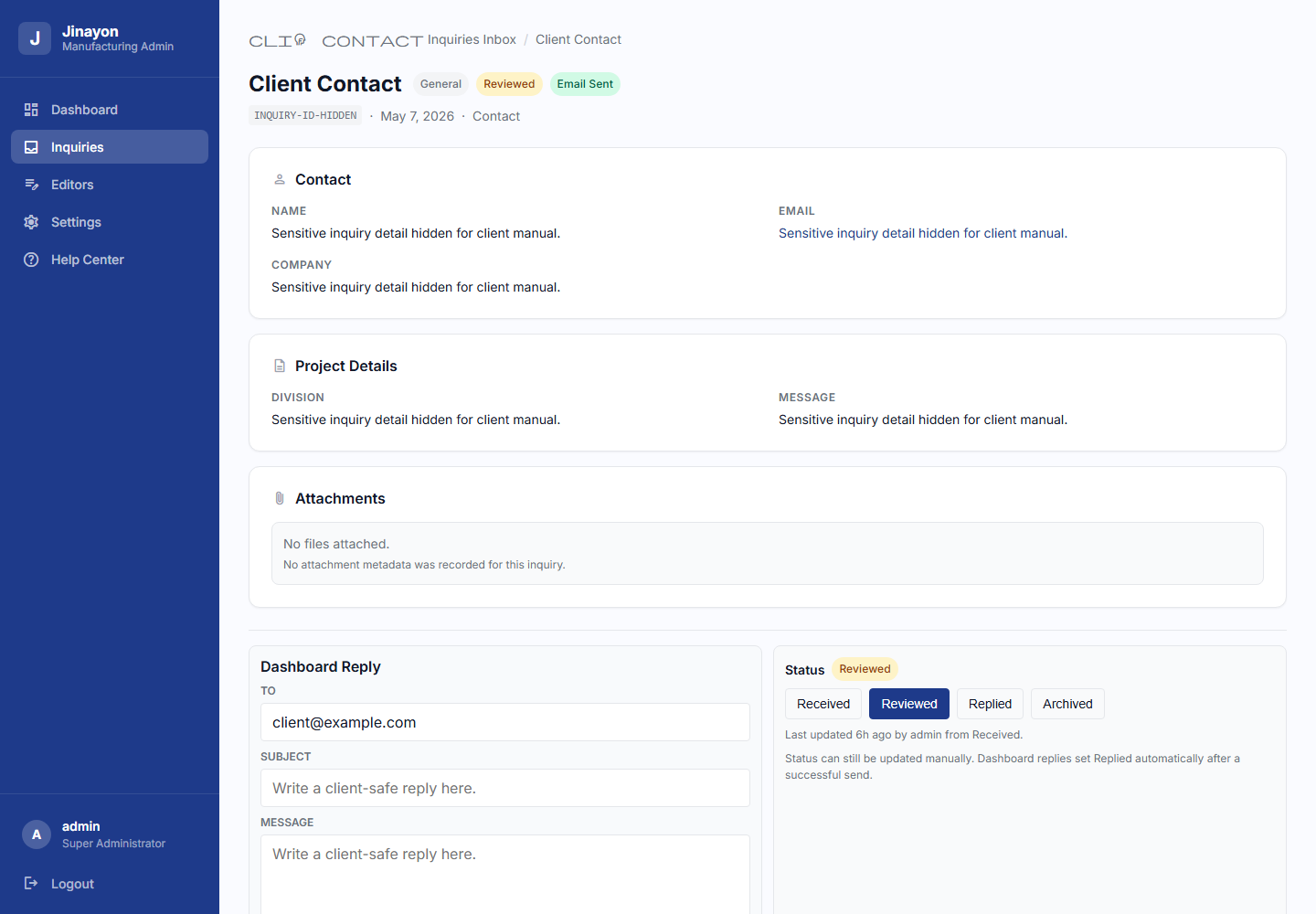
English
The Inquiries area is used to review real customer inquiry records and manage their handling status.
Main workflow:
- Open Inquiries from the sidebar.
- Use filters to view Received, Reviewed, Replied, or Archived inquiries.
- Select an inquiry row to open the detail page.
- Review the contact, project details, files, and current status.
- Update the status only when it reflects real work.
Status meanings:
- Received: inquiry arrived and has not been reviewed yet.
- Reviewed: the team has reviewed the inquiry.
- Replied: a dashboard reply was sent successfully, or the team intentionally marked it replied.
- Archived: the inquiry is no longer active.
Dashboard replies are available from the inquiry detail page. A reply marks the inquiry as Replied only after the dashboard send completes successfully. Do not assume a status change alone means an email was sent.
Attachments are available only when the file was stored by the secure dashboard attachment system. Older inquiry records may show metadata only if the original file was delivered by email before secure storage existed.
中文
询盘管理用于查看真实客户询盘,并记录处理状态。
主要流程:
- 在左侧菜单打开 Inquiries。
- 使用筛选按钮查看 Received、Reviewed、Replied 或 Archived 状态。
- 点击某一条询盘,进入详情页。
- 查看联系人、项目需求、附件和当前状态。
- 只有在真实处理进度发生变化时,才更新状态。
状态含义:
- Received:询盘已收到,但尚未处理。
- Reviewed:团队已经查看并评估该询盘。
- Replied:后台回复已成功发送,或团队明确标记为已回复。
- Archived:该询盘已归档,不再作为当前待处理事项。
询盘详情页可以发送后台回复。只有后台发送成功后,系统才会自动把询盘标记为 Replied。不要把单纯的状态变化误认为邮件已经发送。
附件只有在通过安全附件系统存储后才可以下载。较早的询盘可能只显示附件元数据,因为当时文件可能只通过邮件发送,并没有保存到后台附件存储中。
5. Company Settings
5. 公司信息设置
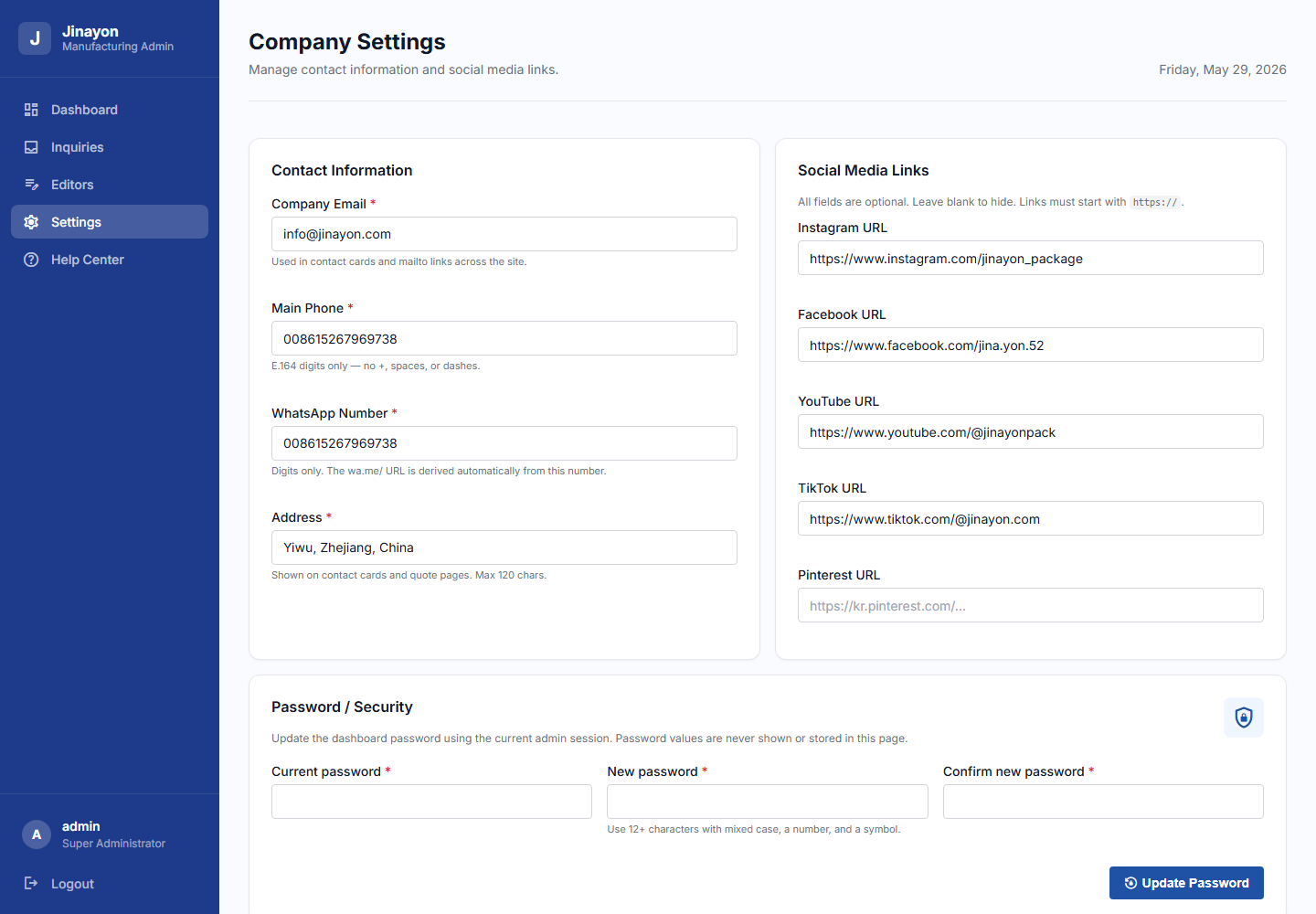
English
Company Settings controls public company contact information such as email, phone, WhatsApp number, address, and social links.
Safe workflow:
- Open Settings.
- Edit one field or one small group of fields.
- Check validation messages.
- Select Save Settings.
- Refresh the relevant public page to confirm the change.
Required fields must remain complete. Social links are optional, but when used they must start with https://.
中文
公司信息设置用于管理网站公开显示的联系方式,包括邮箱、电话、WhatsApp、地址和社交媒体链接。
推荐操作流程:
- 打开 Settings。
- 一次只修改一个字段或一小组字段。
- 查看校验提示。
- 点击 Save Settings 保存。
- 刷新对应的前台页面,确认修改结果。
必填字段必须保持完整。社交链接是可选项,但填写时必须以 https:// 开头。
6. Password And Security
6. 密码与安全
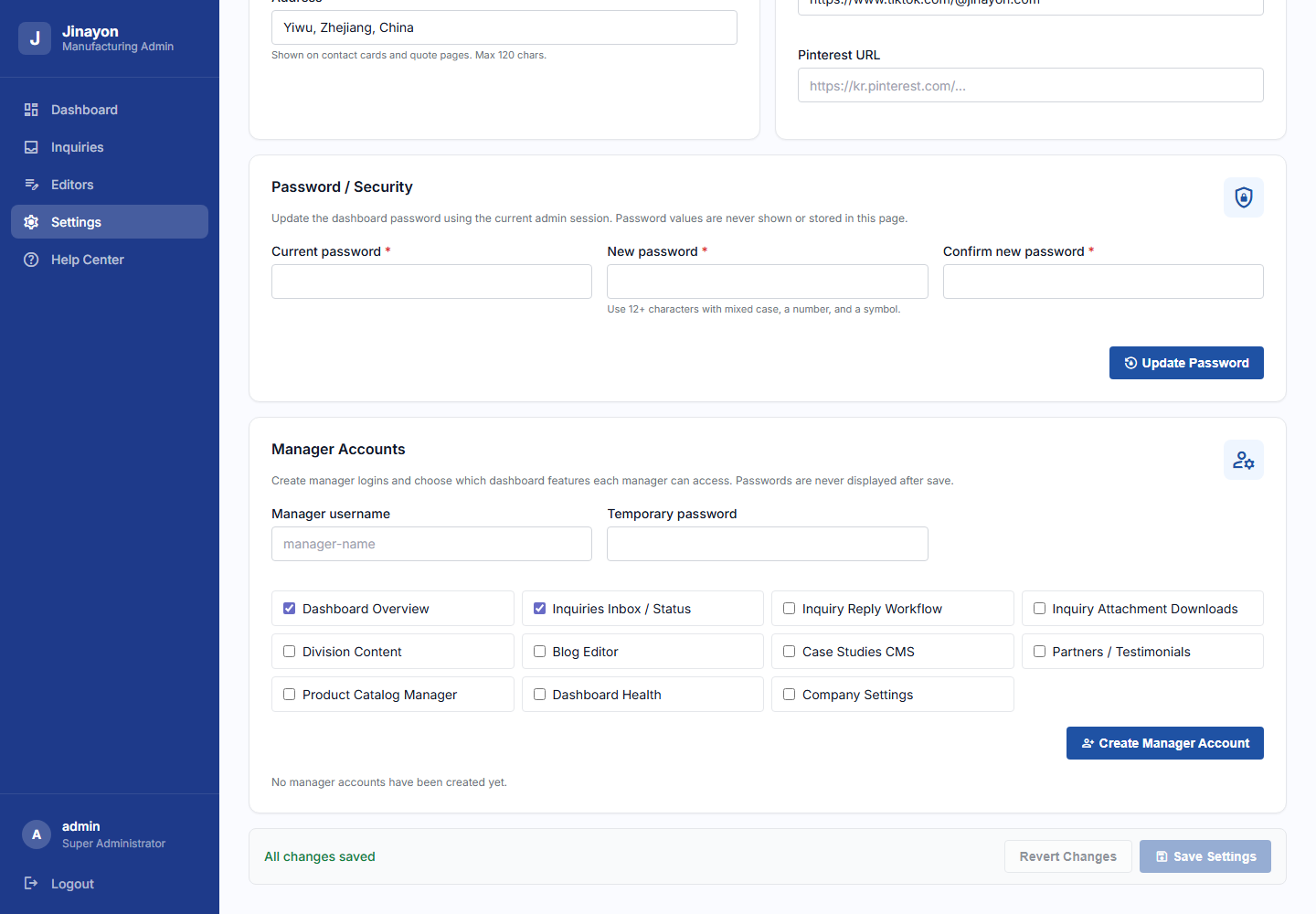
English
Use Password / Security to change the dashboard password. The page asks for the current password, the new password, and confirmation.
Password safety:
- Use at least 12 characters.
- Include uppercase, lowercase, number, and symbol.
- Do not reuse weak or shared passwords.
- Do not send passwords through public chat or screenshots.
- If locked out, contact the primary administrator.
Manager Accounts are also managed in Settings. The primary administrator can create manager logins and choose exactly which dashboard features each manager can access.
中文
使用 Password / Security 可以修改后台密码。页面会要求输入当前密码、新密码和确认密码。
密码安全建议:
- 至少 12 个字符。
- 包含大写字母、小写字母、数字和符号。
- 不要重复使用弱密码或共享密码。
- 不要通过公开聊天或截图发送密码。
- 如果无法登录,请联系主管理员。
经理账号也在设置页面中管理。主管理员可以创建经理登录账号,并选择该经理可以访问哪些后台功能。
7. Content Editors Home
7. 内容编辑中心
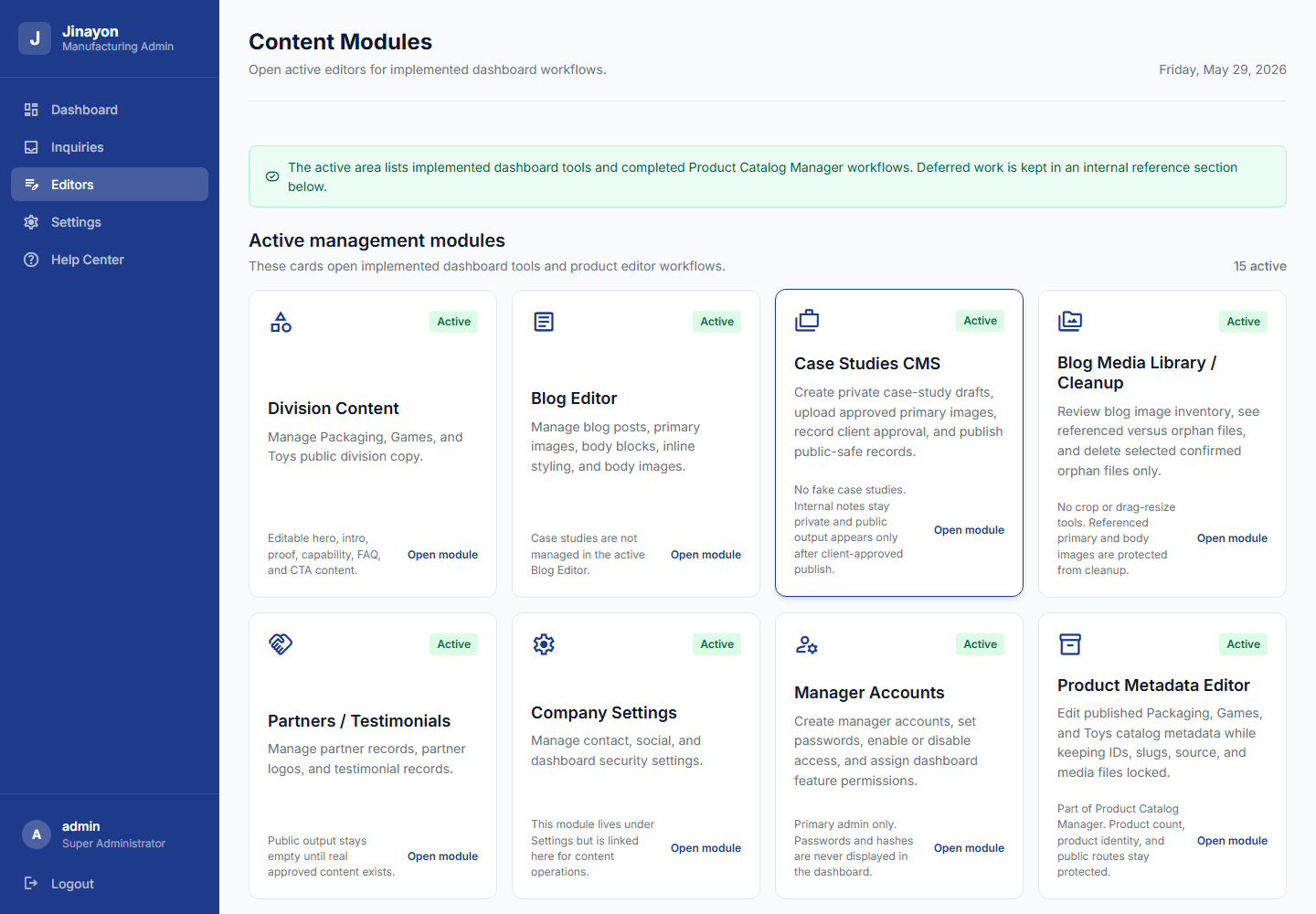
English
The Editors page lists active management modules and future modules separately. Active cards are working dashboard tools. Future cards are internal roadmap references and should not be treated as available.
Currently active areas include Division Content, Blog Editor, Case Studies CMS, Blog Media Library, Partners / Testimonials, Company Settings, Manager Accounts, Product Catalog Manager workflows, Inquiry Reply Workflow, Inquiry Attachments, and Dashboard Health.
中文
内容编辑中心会把“已可用模块”和“未来模块”分开显示。Active 卡片代表已完成并可使用的后台工具。Future/Deferred 卡片只是内部路线图参考,不应当当作已开放功能使用。
当前可用模块包括事业部内容、博客编辑器、案例研究 CMS、博客图片库、合作伙伴/客户评价、公司设置、经理账号、产品目录管理相关流程、询盘回复、询盘附件以及后台健康检查。
8. Division Content Editor
8. 事业部内容编辑
English
The Division Content Editor controls public page copy for Packaging, Games, and Toys. It can manage hero copy, intro content, proof points, capability sections, FAQ content, and CTA sections.
Safe editing advice:
- Choose the correct division tab.
- Edit only verified, client-approved wording.
- Avoid unverifiable claims.
- Save changes.
- Check the public page after saving.
中文
事业部内容编辑器用于管理 Packaging、Games、Toys 三个事业部页面的公开文案。可编辑范围包括首屏文案、介绍内容、证明点、能力说明、FAQ 和 CTA 区域。
安全编辑建议:
- 选择正确的事业部标签。
- 只填写已经确认并获得客户认可的内容。
- 避免无法证明的宣传语。
- 保存修改。
- 保存后检查前台页面。
9. Blog Editor
9. 博客编辑器
English
The Blog Editor manages blog posts, metadata, primary images, body blocks, inline styling, body image blocks, publish/draft behavior, image alt text, and captions where available.
Recommended workflow:
- Select a blog post or create a new draft if the button is available.
- Update title, excerpt, metadata, and content blocks.
- Add only approved images and meaningful alt text.
- Review the preview.
- Save or publish according to the post status.
Do not publish unapproved claims, fake projects, or copied content without permission.
中文
博客编辑器用于管理博客文章、元信息、主图、正文区块、行内样式、正文图片区块、发布/草稿状态、图片 alt 文本和说明文字。
推荐流程:
- 选择一篇博客,或在按钮可用时创建草稿。
- 修改标题、摘要、元信息和正文区块。
- 只使用已批准的图片,并填写有意义的 alt 文本。
- 查看预览。
- 根据文章状态保存或发布。
不要发布未经批准的宣传语、虚假项目或未经授权复制的内容。
10. Partners And Testimonials
10. 合作伙伴与客户评价
English
Partners and Testimonials are for real approved partner records, logos, and client testimonials. Public output remains empty until approved content exists.
Rules:
- Do not create fake logos.
- Do not invent customer names.
- Do not publish fake reviews.
- Keep unpublished or unapproved items hidden.
中文
合作伙伴与客户评价模块只用于真实、已批准的合作伙伴记录、Logo 和客户评价。如果没有已批准内容,前台应保持空状态。
规则:
- 不要创建假 Logo。
- 不要编造客户名称。
- 不要发布虚假评价。
- 未批准或未发布的内容应保持隐藏。
11. Product Catalog Manager
11. 产品目录管理
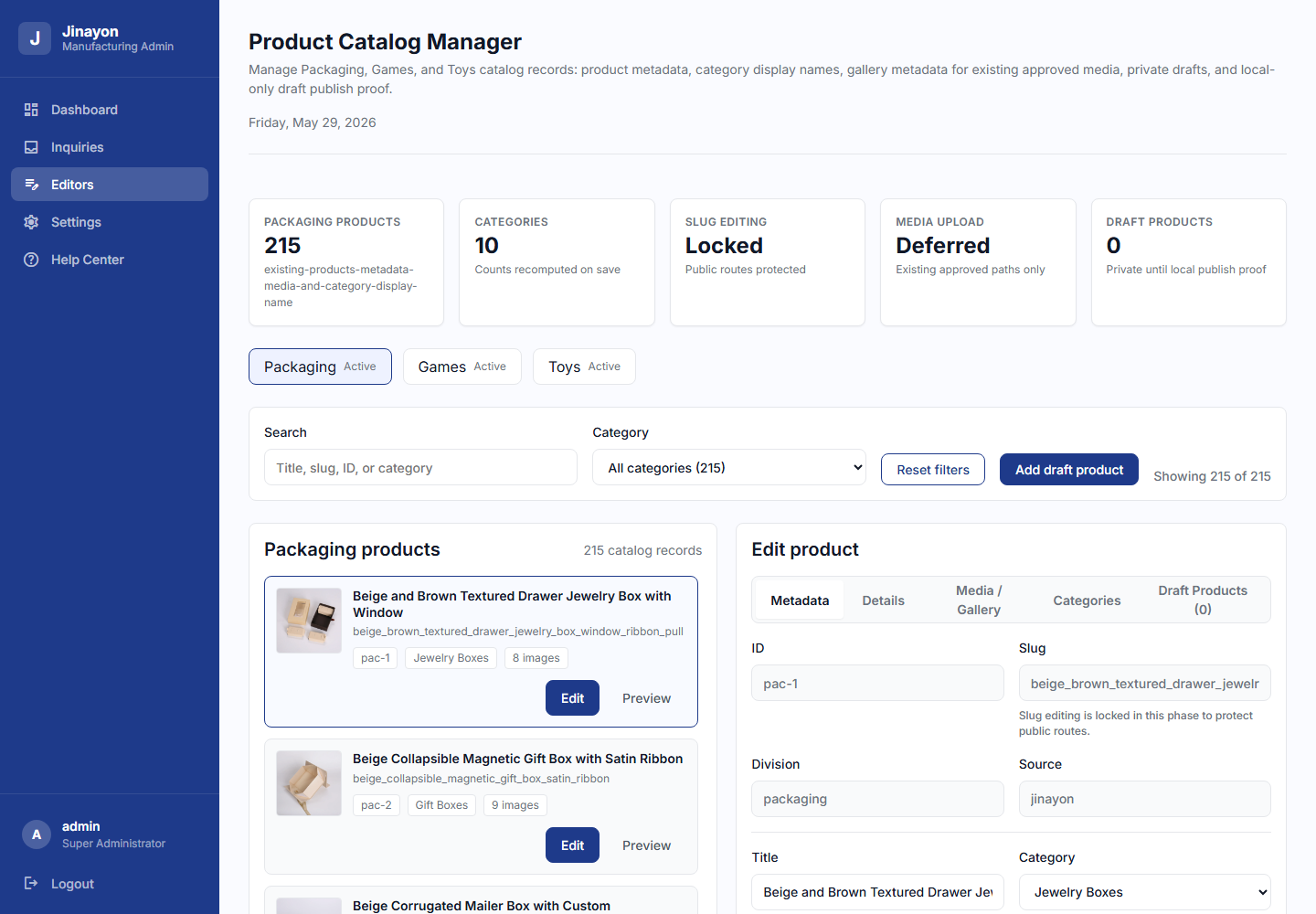
English
The Product Catalog Manager supports Packaging, Games, and Toys products. It is used to search, select, and edit product metadata while protecting product identity.
Locked fields:
- Product ID.
- Slug.
- Source.
- Category ID.
Editable metadata may include product title, display category, description, features, material, finish, thumbnail reference, and existing gallery references depending on the selected tab. Save carefully and use Revert if a change is not correct.
中文
产品目录管理支持 Packaging、Games、Toys 三类产品。它用于搜索、选择和编辑产品基础信息,同时保护产品身份字段不被随意修改。
锁定字段:
- 产品 ID。
- Slug。
- Source。
- Category ID。
可编辑信息可能包括产品标题、显示分类、描述、特点、材质、工艺、缩略图引用和已有图库引用,具体取决于当前标签页。请谨慎保存;如果修改不正确,请使用 Revert 撤销。
12. Product Media / Gallery
12. 产品图片与图库
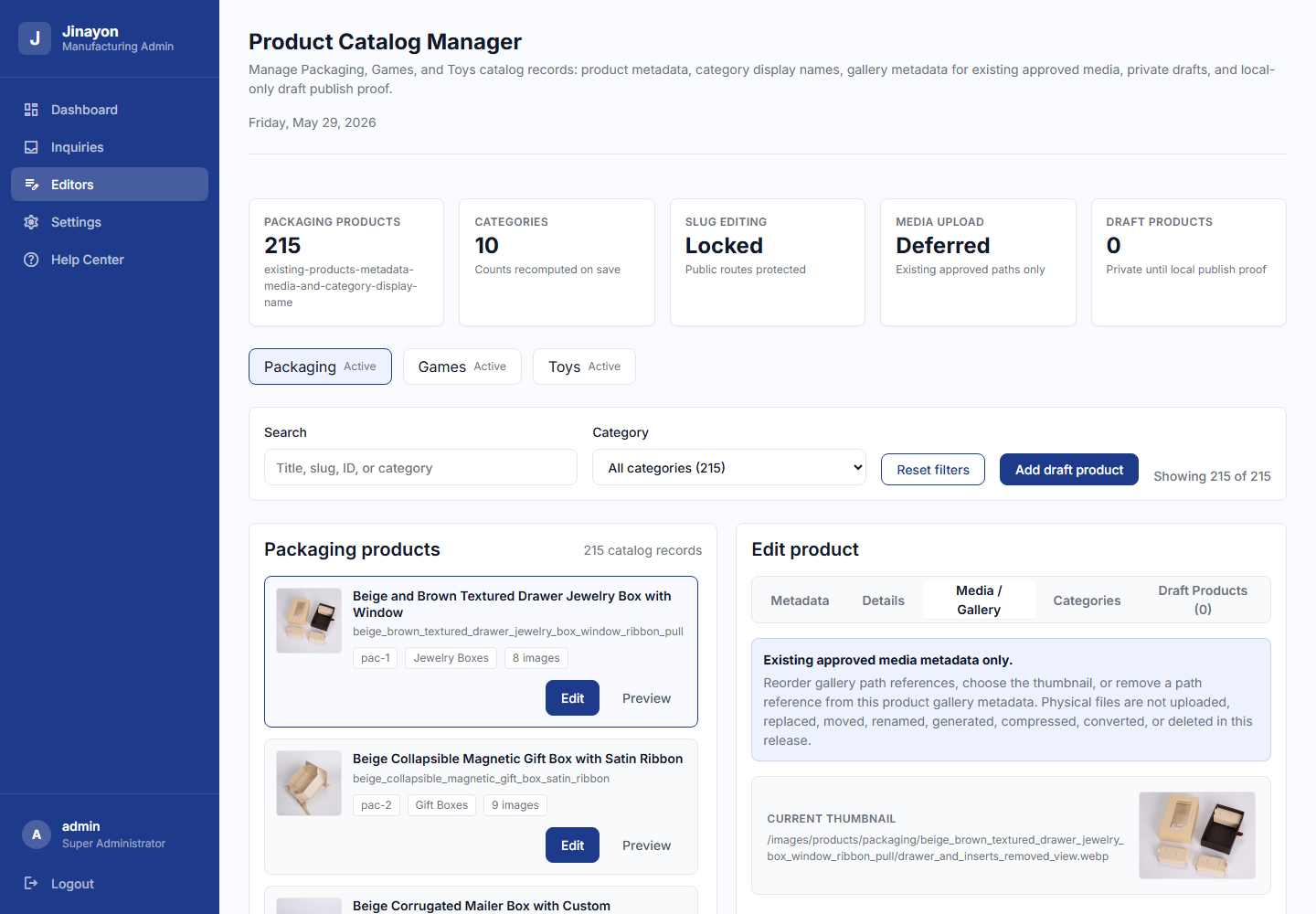
English
The Media / Gallery tab manages existing approved image references. It can reorder gallery images, select a thumbnail, and remove a gallery reference from the product record.
Important boundary:
- This does not physically delete image files.
- This does not upload new product images.
- This does not rename, move, compress, convert, or generate images.
中文
Media / Gallery 标签用于管理已有、已批准的图片引用。它可以调整图库顺序、选择缩略图,并从产品记录中移除某个图库引用。
重要边界:
- 这不会物理删除图片文件。
- 这不会上传新产品图片。
- 这不会重命名、移动、压缩、转换或生成图片。
13. Product Categories
13. 产品分类
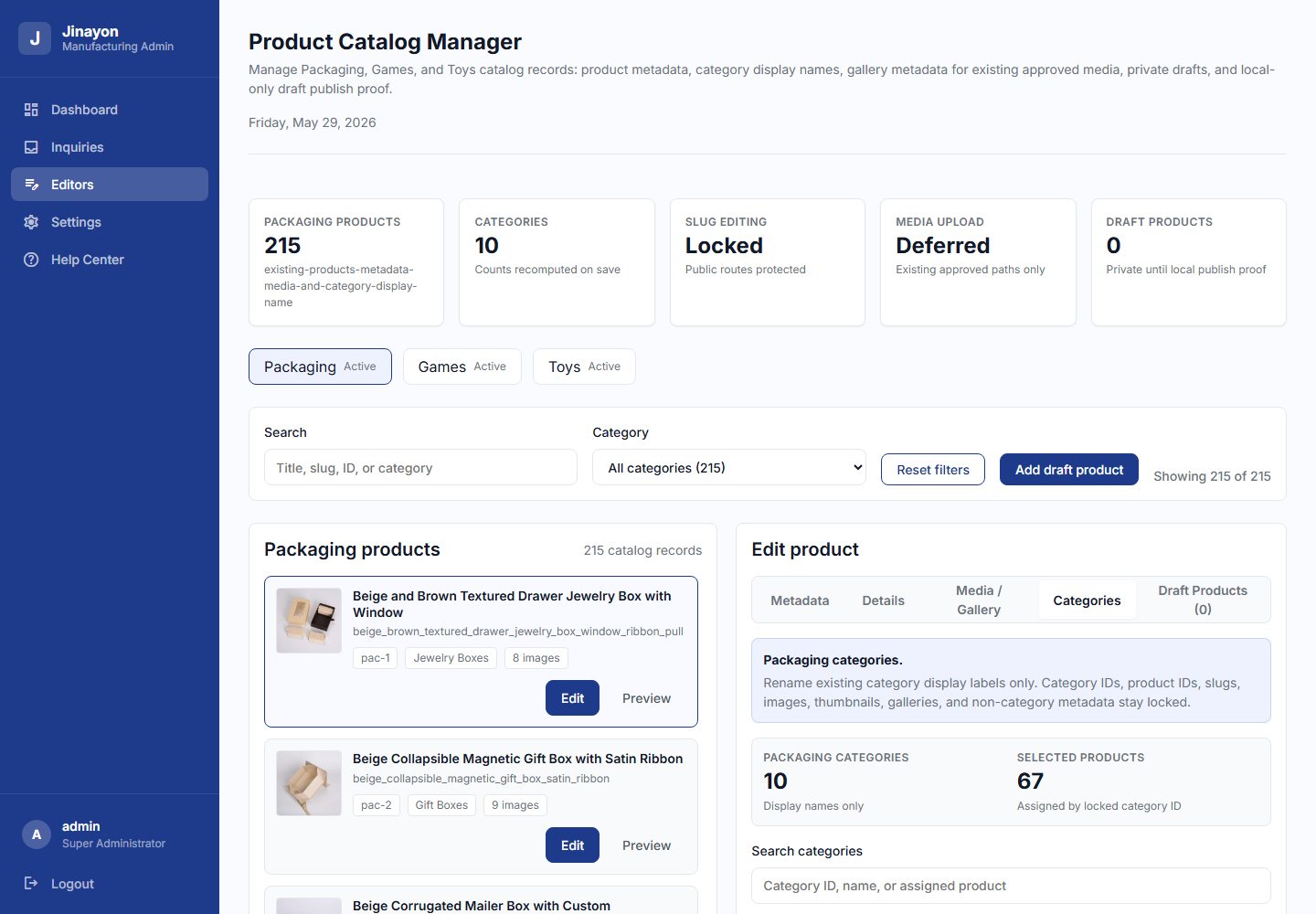
English
The Categories tab edits category display names. Category IDs remain locked. Use this when a category label needs clearer wording on the dashboard or public site.
Do not use this tab to create, delete, merge, or restructure categories. Those are separate future workflows.
中文
Categories 标签用于编辑分类显示名称。分类 ID 是锁定的。只有当后台或前台需要更清晰的分类名称时,才使用此功能。
不要使用该标签创建、删除、合并或重构分类。这些属于未来单独审批的流程。
14. Draft Products
14. 草稿产品
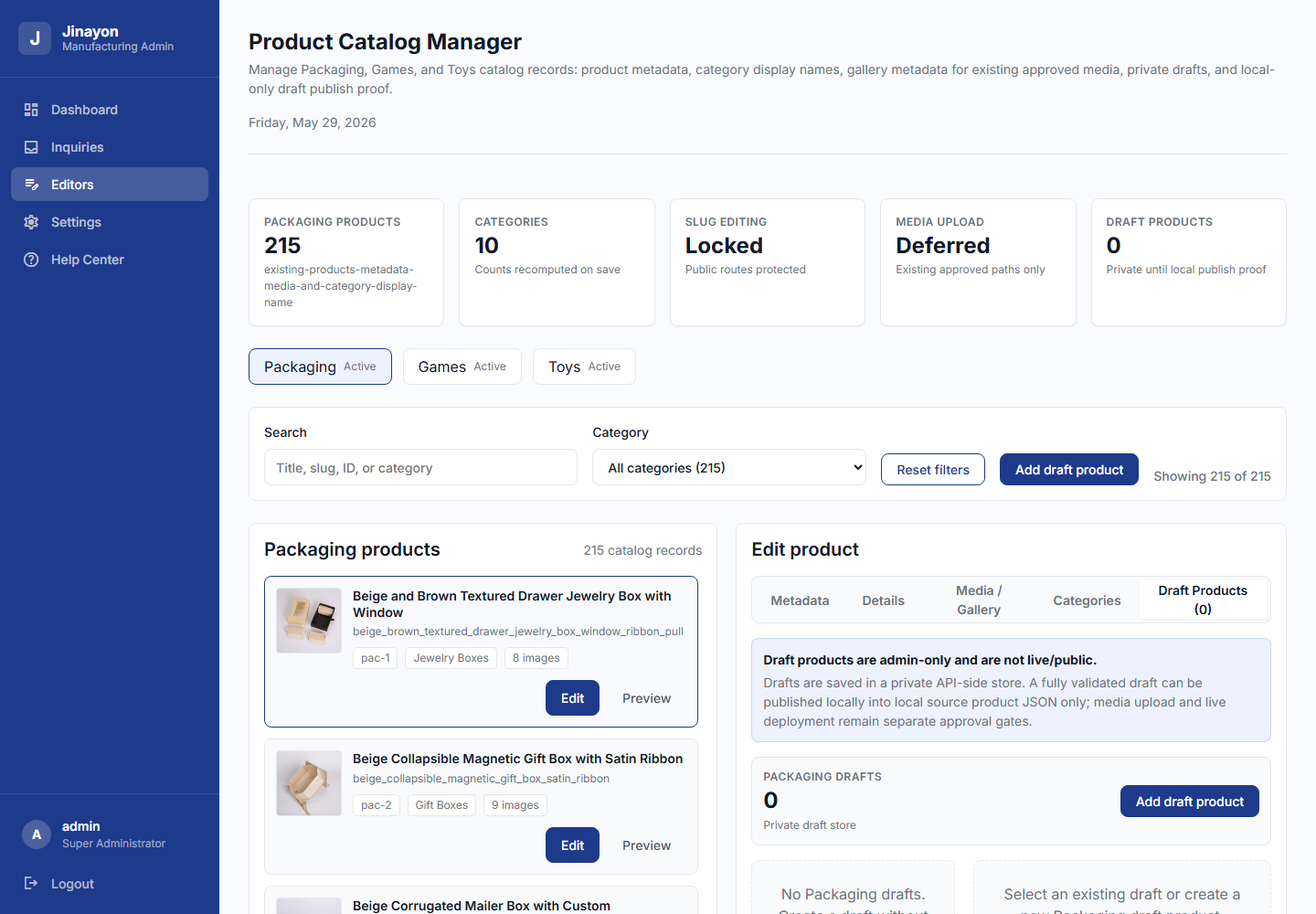
English
Draft Products allows the team to create private product drafts, validate required fields, save drafts, discard drafts, and publish a valid draft when approved.
Safe workflow:
- Start a draft in the correct division.
- Fill required fields.
- Check validation.
- Save the draft.
- Review the draft before publishing.
- Publish only when the product is real, approved, and ready.
Publishing a draft adds a product record. It does not upload physical media files or automatically create new images.
中文
草稿产品功能允许团队创建私有产品草稿、校验必填字段、保存草稿、丢弃草稿,并在内容合格且获得批准后发布。
安全流程:
- 在正确的事业部创建草稿。
- 填写必填字段。
- 查看校验结果。
- 保存草稿。
- 发布前再次检查。
- 只有当产品真实、已批准并准备好公开时,才发布。
发布草稿会新增产品记录。它不会上传实体图片文件,也不会自动生成新图片。
15. Product Details Editor
15. 产品详情编辑器
English
The Details tab manages optional public product detail content for existing products.
Supported fields:
- Summary.
- Overview.
- Badges.
- Specification groups and rows.
- Notes: material, manufacturing, customization, packaging, production, safety.
- CTA note.
The admin preview shows plain text only. Save, reload, clear, and revert are available. Public product pages render details only when approved detail content exists.
Boundaries:
- No SEO fields here.
- No media upload here.
- No slug editing here.
- No product ID editing here.
- No product duplicate/delete/archive workflow here.
中文
Details 标签用于管理已有产品的可选公开详情内容。
支持字段:
- Summary 简短摘要。
- Overview 详细介绍。
- Badges 标签。
- 规格分组与规格行。
- Notes:材质、制造、定制、包装、生产、安全说明。
- CTA note 行动按钮提示。
后台预览只显示纯文本。可以保存、重新加载、清空和撤销。前台产品页只有在存在已批准详情内容时才会显示这些信息。
边界:
- 这里不包含 SEO 字段。
- 这里不上传媒体。
- 这里不编辑 slug。
- 这里不编辑产品 ID。
- 这里不提供复制、删除、归档产品流程。
16. Dashboard Health
16. 后台健康检查
English
Dashboard Health shows real operational signals from inquiry, product, content, draft, and admin protection checks.
Typical labels:
- Healthy: the check is currently passing.
- Needs attention: review this area.
- Blocked: action may be required before relying on this area.
- Not measured: the dashboard does not currently measure this signal.
This is not fake analytics, and it is not a guarantee of SEO, sales, or traffic performance.
中文
后台健康检查显示来自询盘、产品、内容、草稿和后台保护检查的真实运行信号。
常见标签含义:
- Healthy:当前检查通过。
- Needs attention:该区域需要关注。
- Blocked:可能需要处理后才能继续依赖该功能。
- Not measured:后台当前没有测量此项。
这不是虚假分析数据,也不是对 SEO、销售或流量效果的保证。
17. Help Center
17. 帮助中心
English
The Help Center is the dashboard runbook. It explains what each area does, which workflows are active, and what remains limited or future-only.
Use it when:
- You are unsure which module to open.
- You need to understand a dashboard boundary.
- You need a reminder before editing content or products.
中文
帮助中心是后台内部操作手册。它说明每个区域的用途、当前已开放流程以及仍有限制或未来才会开放的功能。
适用场景:
- 不确定应该打开哪个模块。
- 需要了解某个后台功能的边界。
- 编辑内容或产品前需要快速确认流程。
18. Case Studies
18. 案例研究
English
Case Studies CMS is active for controlled case-study management. It supports private drafts, metadata, content blocks, client approval tracking, approved primary image upload, and publish gates for public-safe records.
Rules:
- Drafts are not public.
- Internal notes are not public.
- Client approval is required before publishing.
- Do not create fake clients, fake results, fake metrics, fake testimonials, or fake project names.
- Public
/casesremains honest when there are zero approved published case studies.
中文
案例研究 CMS 已用于受控案例管理。它支持私有草稿、元信息、正文区块、客户审批状态、已批准主图上传,以及只发布公开安全内容的发布门槛。
规则:
- 草稿不会公开。
- 内部备注不会公开。
- 发布前必须获得客户审批。
- 不要编造客户、结果、数据、评价或项目名称。
- 当没有已批准案例时,前台
/cases会保持真实的空状态。
19. Blog Media Library / Cleanup
19. 博客图片库 / 清理工具
English
Blog Media Library / Cleanup reviews blog image inventory. It shows referenced files and orphan files. Confirmed orphan files can be selected for cleanup.
Rules:
- Referenced primary and body images are protected.
- Delete only confirmed orphan files.
- Crop UI and drag-resize image editing are not part of this tool.
中文
博客图片库/清理工具用于查看博客图片库存。它会显示已被文章引用的图片和孤立图片。确认无引用的孤立图片可以选择清理。
规则:
- 已被主图或正文图片引用的文件会受到保护。
- 只删除确认无引用的孤立文件。
- 裁剪工具和拖拽调整图片尺寸不属于当前工具。
20. Manager Accounts
20. 经理账号
English
The primary administrator can create manager accounts, set a temporary password, enable or disable access, and choose dashboard permissions.
Recommended workflow:
- Enter a manager username.
- Enter a temporary password.
- Select only the features that manager needs.
- Create the account.
- Share the password privately and ask the manager to store it safely.
Passwords are not shown after saving. Password hashes are not displayed in the dashboard.
中文
主管理员可以创建经理账号、设置临时密码、启用或禁用访问,并选择该经理可以使用的后台功能。
推荐流程:
- 输入经理用户名。
- 输入临时密码。
- 只勾选该经理实际需要的功能。
- 创建账号。
- 私下安全地分享密码,并提醒经理妥善保存。
密码保存后不会再次显示。密码哈希也不会显示在后台页面中。
21. Common Safe Workflow
21. 推荐安全操作流程
English
- Login.
- Choose the correct module.
- Make one small change.
- Review validation messages.
- Use preview if available.
- Save.
- Refresh the affected public page if applicable.
- Confirm the result.
- Avoid changing many unrelated items at once.
- Report unexpected behavior before repeating the action.
中文
- 登录后台。
- 选择正确模块。
- 一次只做一个小修改。
- 查看校验提示。
- 如有预览功能,先查看预览。
- 保存。
- 如影响前台页面,请刷新对应页面查看。
- 确认结果正确。
- 避免一次修改多个无关内容。
- 如出现异常,请先反馈,不要重复操作。
22. What Not To Do
22. 不建议操作事项
English
Do not:
- Share passwords.
- Paste unsafe HTML, scripts, or suspicious links.
- Invent testimonials, client logos, case studies, metrics, or project outcomes.
- Treat an inquiry status change as proof that an email was sent.
- Delete media directly from hosting unless trained and approved.
- Edit server files directly.
- Overwrite inquiry logs.
- Use deferred modules as if they are active.
中文
不要:
- 分享密码。
- 粘贴不安全 HTML、脚本或可疑链接。
- 编造客户评价、Logo、案例研究、数据或项目成果。
- 把询盘状态变化当作邮件已发送的证明。
- 未经培训和批准,直接在主机上删除媒体文件。
- 直接编辑服务器文件。
- 覆盖询盘日志。
- 把未开放模块当作已可用模块使用。
23. Troubleshooting
23. 常见问题处理
English
| Problem | What to check |
|---|---|
| Cannot login | Confirm username/password and ask the primary admin if the account is disabled. |
| Save button disabled | Check required fields and validation messages. |
| Validation error | Fix the highlighted field before saving. |
| Public page did not update | Refresh the public page and clear browser cache if needed. |
| Draft will not publish | Review required fields, duplicate slug warnings, and validation summary. |
| Inquiry status not changing | Confirm you are logged in and have permission. |
| Reply did not send | Do not retry repeatedly; report the error to support. |
| Image preview missing | Confirm the image reference exists and is approved. |
| Password change failed | Check current password and new password requirements. |
中文
| 问题 | 检查方法 |
|---|---|
| 无法登录 | 确认用户名/密码,并联系主管理员检查账号是否被禁用。 |
| 保存按钮不可用 | 检查必填字段和校验提示。 |
| 出现校验错误 | 先修正被标记的字段,再保存。 |
| 前台页面未更新 | 刷新前台页面,必要时清理浏览器缓存。 |
| 草稿无法发布 | 检查必填字段、重复 slug 提示和校验摘要。 |
| 询盘状态无法修改 | 确认已登录且拥有权限。 |
| 回复未发送 | 不要连续重复发送,请将错误反馈给支持人员。 |
| 图片预览缺失 | 确认图片引用存在且已批准。 |
| 修改密码失败 | 检查当前密码以及新密码规则。 |
24. Quick Reference Checklist
24. 快速检查清单
English
Before saving:
- Correct module selected.
- Correct division/product/post selected.
- Text is approved and accurate.
- No fake claims or fake testimonials.
- Validation passes.
- Preview looks correct.
- Only intended fields changed.
After saving:
- Refresh the public page if affected.
- Confirm the result.
- Logout when finished.
中文
保存前:
- 已选择正确模块。
- 已选择正确事业部、产品或文章。
- 文案真实、已批准。
- 没有虚假宣传或虚假评价。
- 校验通过。
- 预览显示正确。
- 只修改了预期字段。
保存后:
- 如影响前台页面,请刷新查看。
- 确认结果正确。
- 完成后退出登录。
25. Appendix: Feature Availability
25. 附录:功能状态
| Feature | Available Now | Partially Available | Deferred | Notes |
|---|---|---|---|---|
| Dashboard Overview | Yes | No | No | Real status signals only. |
| Inquiries Inbox / Status | Yes | No | No | Real inquiry records only. |
| Inquiry Reply Workflow | Yes | No | No | Reply send is separate from manual status changes. |
| Inquiry Attachments | Yes | Yes | No | Secure downloads only when stored files exist. |
| Company Settings | Yes | No | No | Contact/social settings. |
| Password / Security | Yes | No | No | Password change available; no password is displayed. |
| Manager Accounts | Yes | No | No | Primary admin creates managers and permissions. |
| Division Content Editor | Yes | No | No | Packaging, Games, Toys content. |
| Blog Editor | Yes | No | No | Blog content and image blocks. |
| Blog Media Library / Cleanup | Yes | Yes | No | Orphan cleanup only; crop/resize remains deferred. |
| Partners / Testimonials | Yes | Yes | No | Use real approved content only. |
| Product Metadata Editor | Yes | No | No | Product identity fields remain locked. |
| Product Media / Gallery Metadata | Yes | Yes | No | Metadata-only; no physical file upload/delete. |
| Product Category Display Names | Yes | No | No | Display names only; IDs locked. |
| Draft Products | Yes | No | No | Create, validate, discard, publish approved drafts. |
| Product Details Editor | Yes | No | No | No SEO/media/lifecycle actions. |
| Dashboard Health | Yes | No | No | Real operational checks only. |
| Help Center | Yes | No | No | Dashboard runbook and boundaries. |
| Case Studies CMS | Yes | Yes | No | Draft/approval/publish gate active; no fake public content. |
| Backlinks | No | No | Yes | Future approved phase only. |
| SEO Helper Tools | No | No | Yes | Future approved phase only. |
| Sitemap / Robots Tools | No | No | Yes | Future approved phase only. |
| Google Search Console Helper | No | No | Yes | Requires client Google account access. |
| Product Physical Media Manager | No | No | Yes | Upload/delete/move/rename/generation not active. |
| Product Lifecycle Actions | No | No | Yes | Duplicate/delete/archive/restore not active. |
| Bulk / CSV / AI Product Generation | No | No | Yes | Future approved phase only. |
中文功能状态说明
| 功能 | 当前可用 | 部分可用 | 延后 | 说明 |
|---|---|---|---|---|
| 后台总览 | 是 | 否 | 否 | 只显示真实状态信号。 |
| 询盘列表/状态 | 是 | 否 | 否 | 只显示真实询盘记录。 |
| 询盘回复 | 是 | 否 | 否 | 发送回复与手动状态更新是不同操作。 |
| 询盘附件 | 是 | 是 | 否 | 只有已安全存储的文件可下载。 |
| 公司设置 | 是 | 否 | 否 | 联系方式与社交链接。 |
| 密码/安全 | 是 | 否 | 否 | 可修改密码,但不会显示密码。 |
| 经理账号 | 是 | 否 | 否 | 主管理员创建账号并分配权限。 |
| 事业部内容编辑 | 是 | 否 | 否 | Packaging、Games、Toys 内容。 |
| 博客编辑器 | 是 | 否 | 否 | 博客内容和图片区块。 |
| 博客图片库/清理 | 是 | 是 | 否 | 只清理确认无引用的孤立图片;裁剪/缩放仍延后。 |
| 合作伙伴/客户评价 | 是 | 是 | 否 | 只能使用真实已批准内容。 |
| 产品基础信息编辑 | 是 | 否 | 否 | 产品身份字段保持锁定。 |
| 产品图片/图库元数据 | 是 | 是 | 否 | 只管理元数据,不物理上传/删除文件。 |
| 产品分类显示名称 | 是 | 否 | 否 | 只修改显示名称,ID 锁定。 |
| 草稿产品 | 是 | 否 | 否 | 创建、校验、丢弃、发布已批准草稿。 |
| 产品详情编辑器 | 是 | 否 | 否 | 不包含 SEO、媒体上传或生命周期操作。 |
| 后台健康检查 | 是 | 否 | 否 | 只基于真实运行检查。 |
| 帮助中心 | 是 | 否 | 否 | 后台操作说明与边界。 |
| 案例研究 CMS | 是 | 是 | 否 | 草稿/审批/发布门槛可用;不发布虚假案例。 |
| Backlinks 外链追踪 | 否 | 否 | 是 | 未来单独批准阶段。 |
| SEO 辅助工具 | 否 | 否 | 是 | 未来单独批准阶段。 |
| Sitemap / Robots 工具 | 否 | 否 | 是 | 未来单独批准阶段。 |
| Google Search Console 辅助 | 否 | 否 | 是 | 需要客户 Google 账号权限。 |
| 产品实体媒体管理 | 否 | 否 | 是 | 上传/删除/移动/重命名/生成未开放。 |
| 产品生命周期操作 | 否 | 否 | 是 | 复制/删除/归档/恢复未开放。 |
| 批量/CSV/AI 产品生成 | 否 | 否 | 是 | 未来单独批准阶段。 |
26. Deep Operator Reference: Every Active Tool, Field, And Button
26. 深度操作参考:每个已开放工具、字段与按钮
This section is the detailed operating reference. It explains what each active dashboard control does, when to use it, and what not to expect from it.
本节是详细操作参考,说明每个已开放后台控件的用途、使用时机以及功能边界。
26.1 Sidebar And Global Navigation
26.1 左侧菜单与全局导航
| Control | English Function | 中文功能 |
|---|---|---|
| Dashboard | Opens the main dashboard overview. | 打开后台总览页面。 |
| Inquiries | Opens the inquiry inbox and inquiry detail workflow. | 打开询盘列表与询盘详情流程。 |
| Editors | Opens active content, product, case-study, blog-media, inquiry, and health management modules. | 打开内容、产品、案例、博客图片、询盘和健康检查等已开放模块入口。 |
| Settings | Opens company settings, password/security, and manager accounts. | 打开公司信息、密码安全和经理账号管理。 |
| Help Center | Opens the dashboard runbook and limitations reference. | 打开后台帮助中心与限制说明。 |
| Logout | Ends the current dashboard session. | 退出当前后台登录会话。 |
English note: use Logout when work is finished, especially on shared computers.
中文提示:操作完成后请退出登录,尤其是在多人共用电脑上。
26.2 Login Page Controls
26.2 登录页面控件
| Control | English Function | 中文功能 |
|---|---|---|
| Username | Enter the assigned dashboard username. | 输入分配的后台用户名。 |
| Password | Enter the account password. The manual never documents real passwords. | 输入账号密码。本手册不会记录真实密码。 |
| Sign In | Starts a server-backed login session. | 发起受服务器保护的登录会话。 |
| Support link | Opens email support. Use only for dashboard support needs. | 打开邮件支持入口,仅用于后台支持需求。 |
| Privacy Policy link | Opens the public privacy policy in a new tab. | 在新标签页打开隐私政策。 |
26.3 Inquiries: Inbox, Detail, Reply, Attachments
26.3 询盘:列表、详情、回复、附件
| Control | English Function | 中文功能 |
|---|---|---|
| Status filter buttons | Filter inquiries by All, Received, Reviewed, Replied, Archived, or other real statuses. | 按 All、Received、Reviewed、Replied、Archived 或其他真实状态筛选询盘。 |
| Search input | Searches name, company, email, division, type, and status. | 搜索姓名、公司、邮箱、事业部、类型和状态。 |
| Inquiry row | Opens that inquiry detail page. | 打开该询盘详情页。 |
| Open icon | Same as clicking the row; opens the detail page. | 与点击行相同,用于打开详情页。 |
| Back to Inbox | Returns from detail page to inquiry list. | 从详情页返回询盘列表。 |
| Status buttons | Manually set the handling state. Use only when it matches real handling progress. | 手动设置处理状态。只有在真实处理进度匹配时使用。 |
| Reply Subject | Email subject for dashboard-sent reply. | 后台回复邮件主题。 |
| Reply Message | Plain-text message body. Do not paste HTML or scripts. | 纯文本回复内容。不要粘贴 HTML 或脚本。 |
| Send Reply | Sends the reply through configured server mail. If successful, status becomes Replied. | 通过服务器邮件发送回复。成功后状态变为 Replied。 |
| Secure download | Downloads an attachment only if a stored secure file exists and the account has permission. | 只有存在安全存储文件且账号有权限时,才可下载附件。 |
| Metadata-only note | Explains that older attachment records may not have a downloadable file. | 说明旧附件记录可能只有元数据,没有可下载文件。 |
Important English boundary: changing status is not the same as sending an email. A real dashboard reply happens only through Send Reply.
重要中文边界:修改状态不等于发送邮件。真正的后台邮件回复必须通过 Send Reply 完成。
26.4 Company Settings, Password, Manager Accounts
26.4 公司设置、密码、经理账号
| Field Or Button | English Function | 中文功能 |
|---|---|---|
| Company Email | Public contact email. Must be a valid email. | 公开联系邮箱,必须是有效邮箱。 |
| Main Phone | Public phone number. Digits only. | 公开电话,只能填写数字。 |
| WhatsApp Number | Generates public WhatsApp contact link. Digits only. | 生成公开 WhatsApp 联系链接,只能填写数字。 |
| Address | Public company address text. | 公开公司地址文字。 |
| Social URL fields | Optional public social links. Must start with https://. | 可选公开社交链接,必须以 https:// 开头。 |
| Revert Changes | Discards unsaved settings edits and returns to last loaded values. | 放弃未保存设置,恢复到最后加载的值。 |
| Save Settings | Saves company/social settings after validation passes. | 校验通过后保存公司和社交设置。 |
| Current password | Required when changing the primary dashboard password. | 修改主管理员密码时必须输入当前密码。 |
| New password | New dashboard password. Must meet strength rules. | 新后台密码,必须符合强度规则。 |
| Confirm new password | Must match the new password. | 必须与新密码一致。 |
| Update Password | Saves the password change. Does not show the password afterward. | 保存密码修改,之后不会显示密码。 |
| Manager username | New manager login name. | 新经理登录用户名。 |
| Temporary password | Initial manager password. It is never shown again after save. | 经理初始密码,保存后不会再次显示。 |
| Permission checkboxes | Choose which features the manager can access. | 选择经理可访问的功能。 |
| Create Manager Account | Creates the manager account with selected permissions. | 根据所选权限创建经理账号。 |
| Save Permissions | Saves permission changes for an existing manager. | 保存已有经理账号的权限变更。 |
| Reset Password | Opens a password reset prompt for the selected manager. | 打开该经理账号的密码重置提示。 |
| Disable / Enable | Turns manager access off or back on. | 禁用或启用经理账号访问。 |
English note: assign the smallest permission set that allows the manager to do their job.
中文提示:给经理账号分配“完成工作所需的最小权限”。
26.5 Editors Home
26.5 内容编辑中心
| Control | English Function | 中文功能 |
|---|---|---|
| Active module card | Opens a completed working dashboard tool. | 打开已完成并可使用的后台工具。 |
| Future / requires approval section | Internal roadmap only. Not a working tool yet. | 仅为内部路线图,不代表功能已开放。 |
| Active count | Shows how many active modules the current account can access. | 显示当前账号可访问的已开放模块数量。 |
26.6 Division Content Editor
26.6 事业部内容编辑器
| Field Or Button | English Function | 中文功能 |
|---|---|---|
| Packaging / Games / Toys tabs | Switch the division being edited. | 切换正在编辑的事业部。 |
| Save All Changes | Saves all edited division content. | 保存所有已修改的事业部内容。 |
| Error close button | Dismisses an error message. | 关闭错误提示。 |
| Tagline | Small hero text above the headline. | 首屏标题上方的小文案。 |
| Headline | Main hero headline. | 首屏主标题。 |
| Subheadline | Supporting hero text. | 首屏副标题说明。 |
| Hero CTA Button Label | Text shown on hero action button. | 首屏行动按钮文字。 |
| Intro headline/body | Toys-only intro block when present. | Toys 页面专用介绍区块。 |
| Stat value | Number or short proof value. | 数字或短证明值。 |
| Stat label | Label explaining the stat. | 解释该数字的标签。 |
| Add Stat | Adds a blank stat row. | 新增一条统计数据。 |
| Remove stat | Removes that stat row from the draft. | 从当前草稿中移除该统计行。 |
| FAQ question | Question shown in public FAQ accordion. | 前台 FAQ 折叠项中的问题。 |
| FAQ answer | Answer shown under the question. | 问题下方的答案。 |
| Add FAQ | Adds a blank FAQ row. | 新增一条 FAQ。 |
| Remove FAQ | Removes that FAQ row. | 移除该 FAQ。 |
| CTA headline/subheadline/label | Bottom call-to-action content. | 页面底部 CTA 区域内容。 |
26.7 Blog Editor: Writing, Formatting, Images, Publishing
26.7 博客编辑器:写作、格式、图片、发布
Blog Writing Workflow
博客写作流程
English:
- Open Editors > Blog Editor.
- Select an existing post with Edit, or select New Post.
- Fill metadata first: Title, Excerpt, Category, Date, Author, Read Time.
- Upload or confirm the Primary Image, Alt Text, and Caption if needed.
- Build the article using Body Content blocks.
- Use Preview to review the article structure.
- Set Published/Draft and Featured status.
- Select Save Changes.
中文:
- 打开 Editors > Blog Editor。
- 点击 Edit 编辑已有文章,或点击 New Post 创建新文章。
- 先填写元信息:标题、摘要、分类、日期、作者、阅读时间。
- 如需要,上传或确认主图、Alt 文本和图片说明。
- 使用正文区块搭建文章内容。
- 用 Preview 检查文章结构。
- 设置 Published/Draft 和 Featured 状态。
- 点击 Save Changes 保存。
Blog Controls
博客控件
| Control | English Function | 中文功能 |
|---|---|---|
| New Post | Starts a new unsaved blog post form. | 创建新的未保存博客表单。 |
| Edit | Loads an existing post into the editor. | 将已有文章加载到编辑器。 |
| Trash icon | Opens delete confirmation for that post. | 打开删除该文章的确认窗口。 |
| Delete confirmation: Cancel | Closes delete dialog without deleting. | 关闭删除确认,不删除。 |
| Delete confirmation: Delete | Deletes the post after confirmation. Use carefully. | 确认删除文章,需谨慎使用。 |
| Title | Public blog title. New post slug is generated from title. | 前台博客标题。新文章 slug 会由标题生成。 |
| Slug | URL slug. Editable only when creating a new post; read-only later. | URL slug。只在新建文章时可编辑,之后只读。 |
| Excerpt | Short listing/summary text, max 300 characters. | 列表/摘要文字,最多 300 字符。 |
| Category | One of Packaging, Manufacturing, Games, Toys, Trends, Branding. | 可选择 Packaging、Manufacturing、Games、Toys、Trends、Branding。 |
| Date | Public post date. | 公开显示的文章日期。 |
| Author | Public author label. | 公开显示的作者名称。 |
| Read Time | Short reading-time text such as 5 min read. | 阅读时间文字,例如 5 min read。 |
| Image File | Selects a local WebP/JPG/PNG primary image file. | 选择本地 WebP/JPG/PNG 主图文件。 |
| Alt Text | Required accessible description for image. | 图片无障碍说明,必填。 |
| Caption | Optional visible image caption. | 可选图片说明。 |
| Upload Primary Image | Uploads the selected primary image after the post exists. | 在文章已保存后上传所选主图。 |
| Remove Image | Removes primary image metadata. | 移除主图元数据。 |
| Preview / Edit | Toggles body block preview and editing mode. | 切换正文区块预览和编辑模式。 |
| Add Block | Opens block type menu. | 打开正文区块类型菜单。 |
| Paragraph | Adds normal paragraph text. | 新增普通段落。 |
| Heading (H2) | Adds major section heading. | 新增二级标题。 |
| Subheading (H3) | Adds subsection heading. | 新增三级标题。 |
| Bullet List | Adds unordered list. | 新增项目符号列表。 |
| Numbered List | Adds ordered list. | 新增编号列表。 |
| Quote | Adds quote text and optional attribution. | 新增引用文字和可选出处。 |
| Image | Adds body image block. | 新增正文图片区块。 |
| Divider | Adds visual separator. | 新增视觉分隔线。 |
| Callout | Adds highlighted note/callout block. | 新增强调提示区块。 |
| Block up/down arrows | Move the block up or down in article order. | 上移或下移该区块。 |
| Block X icon | Opens remove-block confirmation. | 打开移除区块确认。 |
| Remove block: Cancel | Keeps the block. | 保留该区块。 |
| Remove block: Remove | Removes the block from the unsaved editor. | 从未保存编辑器中移除区块。 |
| Add item | Adds a list item to bullet or numbered list. | 在列表中新增一项。 |
| Remove item X | Removes that list item. | 移除该列表项。 |
| Body image file | Selects body image file for image block. | 选择正文图片区块的图片文件。 |
| Body image alt text | Required accessible description for body image. | 正文图片无障碍说明,必填。 |
| Body image caption | Optional visible caption. | 可选图片说明。 |
| Width | Sets body image layout: Full width, Wide, or Content width. | 设置正文图片宽度:全宽、宽版或正文宽度。 |
| Upload Body Image | Uploads body image metadata and file for the selected block. | 上传该正文图片区块的图片和元数据。 |
| Tags | Comma-separated labels, max 8. | 逗号分隔标签,最多 8 个。 |
| Published toggle | ON means visible publicly. OFF means draft. | 开启表示公开显示,关闭表示草稿。 |
| Featured toggle | Marks one article as featured; save enforces featured behavior. | 设置为精选文章,保存时生效。 |
| Save Changes | Saves metadata, content blocks, status, and image metadata after validation. | 校验通过后保存元信息、正文区块、状态和图片元数据。 |
Inline Formatting Toolbar
行内格式工具栏
| Control | English Function | 中文功能 |
|---|---|---|
| B | Bold selected text. | 将选中文本加粗。 |
| I | Italicize selected text. | 将选中文本设为斜体。 |
| U | Underline selected text. | 为选中文本加下划线。 |
| Color | Applies an approved text color token. | 应用已批准的文字颜色。 |
| Highlight | Applies an approved highlight background. Not available on heading/subheading blocks. | 应用已批准的高亮背景。标题/副标题区块不可用。 |
| Font | Applies Brand sans, Editorial serif, or Technical mono. Not available on heading/subheading blocks. | 应用品牌无衬线、编辑衬线或技术等宽字体。标题/副标题区块不可用。 |
| Clear | Removes formatting from selected text. | 清除选中文本格式。 |
English note: select text first, then apply B/I/U, color, highlight, font, or clear. Pasting strips rich external formatting and keeps controlled plain text.
中文提示:先选中文本,再使用加粗、斜体、下划线、颜色、高亮、字体或清除。粘贴外部内容时会去除外部复杂格式,保留受控纯文本。
26.8 Partners And Testimonials Controls
26.8 合作伙伴与客户评价控件
| Control | English Function | 中文功能 |
|---|---|---|
| Partners tab | Shows partner records. | 显示合作伙伴记录。 |
| Testimonials tab | Shows客户评价 records. | 显示客户评价记录。 |
| Search | Filters current tab records. | 筛选当前标签记录。 |
| Add Partner | Adds an unpublished partner draft. | 新增未发布合作伙伴草稿。 |
| Add Testimonial | Adds an unpublished testimonial draft. | 新增未发布客户评价草稿。 |
| Partner name | Real approved partner name. | 真实已批准的合作伙伴名称。 |
| Industry | Partner industry label. | 合作伙伴行业标签。 |
| Website | Optional https:// website URL. | 可选 https:// 网站链接。 |
| Division | General, Packaging, Games, or Toys grouping. | General、Packaging、Games 或 Toys 分组。 |
| Featured | Marks item as featured if published. | 标记为精选。 |
| Published | Allows public output only when real and approved. | 在真实且批准后允许公开显示。 |
| Upload logo | Uploads logo only for a saved partner with alt text. | 仅对已保存且有 alt 文本的合作伙伴上传 Logo。 |
| Remove logo | Removes logo metadata; physical files are left untouched. | 移除 Logo 元数据;不会删除实体文件。 |
| Remove/Delete item | Marks an item for removal from the draft; save is required. | 将项目从草稿中移除;仍需保存。 |
| Revert | Restores last loaded source data. | 恢复到最后加载的数据。 |
| Save Changes | Validates and saves partner/testimonial source. | 校验并保存合作伙伴/评价数据。 |
26.9 Product Catalog Manager Controls
26.9 产品目录管理控件
| Control | English Function | 中文功能 |
|---|---|---|
| Packaging / Games / Toys tabs | Switch product division. Unsaved changes trigger warning. | 切换产品事业部;有未保存修改时会提示。 |
| Search products | Filters by title/ID/slug/category. | 按标题、ID、slug、分类筛选产品。 |
| Category filter | Shows products assigned to selected category. | 只显示所选分类下的产品。 |
| Reset filters | Clears product search and category filter. | 清除搜索和分类筛选。 |
| Add draft product | Opens draft product editor. | 打开草稿产品编辑器。 |
| Open/Edit product | Loads selected product into editor. | 将所选产品加载到编辑器。 |
| Metadata tab | Edits title/category/category name/material/finish/description/features. | 编辑标题、分类、分类名、材质、工艺、描述和特点。 |
| Details tab | Edits optional public product detail text. | 编辑可选公开产品详情文字。 |
| Media / Gallery tab | Edits existing gallery metadata only. | 只编辑已有图库元数据。 |
| Categories tab | Edits category display names only. | 只编辑分类显示名称。 |
| Draft Products tab | Creates, validates, saves, discards, and locally publishes product drafts. | 创建、校验、保存、丢弃并本地发布产品草稿。 |
Metadata Tab
基础信息标签
| Control | English Function | 中文功能 |
|---|---|---|
| ID / Slug / Division / Source | Read-only identity fields. | 只读身份字段。 |
| Title | Public product title. | 公开产品标题。 |
| Category | Existing category selector. | 选择已有分类。 |
| Category name | Display label for selected category. | 所选分类的显示名称。 |
| Material | Product material field. | 产品材质字段。 |
| Finish | Product finishing/process field. | 产品工艺/表面处理字段。 |
| Description | Public product description. | 公开产品描述。 |
| Features | One feature per line. | 每行一条特点。 |
| Save product | Saves metadata after validation. | 校验后保存基础信息。 |
| Revert | Restores last loaded product values. | 恢复最后加载的产品值。 |
Details Tab
详情标签
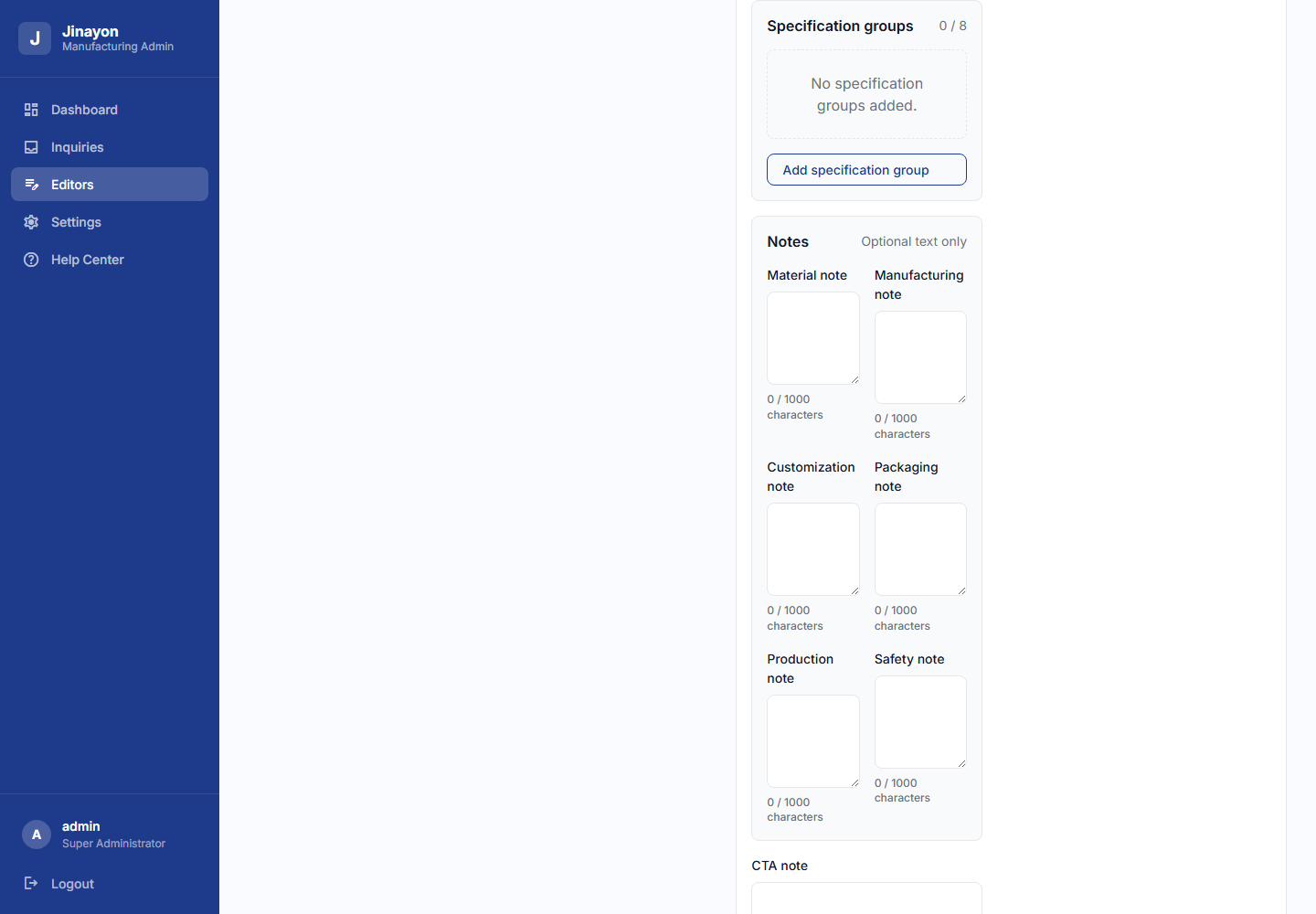
| Control | English Function | 中文功能 |
|---|---|---|
| Summary | Short product detail summary, max 240 chars. | 简短产品详情摘要,最多 240 字符。 |
| Overview | Longer product overview, max 1600 chars. | 较长产品介绍,最多 1600 字符。 |
| Add badge | Adds a short detail badge. | 新增一个短标签。 |
| Badge Up/Down | Reorders badges. | 调整标签顺序。 |
| Remove badge | Removes that badge. | 移除该标签。 |
| Add specification group | Adds a grouped specification section. | 新增规格分组。 |
| Group title | Title for a spec group. | 规格分组标题。 |
| Add row | Adds label/value row inside group. | 在分组中新增标签/值行。 |
| Row Up/Down | Reorders rows inside group. | 调整分组内规格行顺序。 |
| Remove row | Removes that spec row. | 移除该规格行。 |
| Move group up/down | Reorders spec groups. | 调整规格分组顺序。 |
| Remove group | Removes the whole group. | 移除整个规格分组。 |
| Notes fields | Optional Material, Manufacturing, Customization, Packaging, Production, Safety notes. | 可选材质、制造、定制、包装、生产、安全说明。 |
| CTA note | Short note near product quote/request context. | 产品询价/请求附近的短提示。 |
| Save details | Saves only the optional details object. | 只保存可选 details 对象。 |
| Revert details | Restores last loaded details. | 恢复最后加载的详情内容。 |
| Clear details | Starts clear confirmation. | 开始清空确认。 |
| Confirm clear details | Clears details in the editor; Save details is still required. | 在编辑器中清空详情;仍需点击 Save details 才生效。 |
| Cancel clear | Cancels the clear action. | 取消清空操作。 |
Details validation blocks HTML, script-like content, URLs, file paths, image paths, unknown fields, duplicate spec labels inside one group, and overlong values.
详情校验会阻止 HTML、脚本、URL、文件路径、图片路径、未知字段、同组重复规格标签以及超长内容。
Media / Gallery Tab
图片 / 图库标签
| Control | English Function | 中文功能 |
|---|---|---|
| Gallery paths textarea | Edits path references only. | 只编辑图片路径引用。 |
| Move up/down | Reorders gallery image position. | 上移/下移图库图片顺序。 |
| Set as thumbnail | Sets that existing gallery path as thumbnail. | 将该已有图库路径设为缩略图。 |
| Remove reference | Removes path from product gallery metadata. Does not delete file. | 从产品图库元数据中移除路径,不删除文件。 |
| Save media metadata | Saves gallery/thumbnail metadata. | 保存图库/缩略图元数据。 |
| Revert media changes | Restores last loaded gallery metadata. | 恢复最后加载的图库元数据。 |
Categories Tab
分类标签
| Control | English Function | 中文功能 |
|---|---|---|
| Search categories | Finds category by ID/name/product. | 按 ID、名称或产品查找分类。 |
| Category row | Selects category for editing. | 选择要编辑的分类。 |
| Locked category ID | Read-only ID. | 只读分类 ID。 |
| Display name | Editable public/admin display name. | 可编辑公开/后台显示名称。 |
| Assigned products | Preview of products using this category ID. | 预览使用该分类 ID 的产品。 |
| Save category display name | Saves display-name changes. | 保存分类显示名。 |
| Revert category name | Restores last loaded category name. | 恢复最后加载的分类名。 |
Draft Products Tab
草稿产品标签
| Control | English Function | 中文功能 |
|---|---|---|
| Add draft product | Opens a new private draft form. | 打开新的私有草稿表单。 |
| Draft list row | Selects existing private draft. | 选择已有私有草稿。 |
| Title | Required draft product title. | 必填草稿产品标题。 |
| Category | Required existing category. | 必填已有分类。 |
| Material / Finish | Required product material and finish. | 必填产品材质和工艺。 |
| Description | Required product description. | 必填产品描述。 |
| Features | One feature per line. | 每行一个产品特点。 |
| Thumbnail path | Existing approved media path. | 已有已批准媒体路径。 |
| Gallery paths | Existing approved gallery paths, one per line. | 已有已批准图库路径,每行一个。 |
| Completeness checklist | Shows what is OK or missing. | 显示哪些项已完成或缺失。 |
| Regenerate slug from title | Regenerates slug candidate from title. | 根据标题重新生成 slug 候选。 |
| Save draft | Saves private draft only. | 只保存私有草稿。 |
| Revert draft | Restores last loaded draft values. | 恢复最后加载的草稿值。 |
| Discard draft / Close draft form | Deletes saved draft or closes unsaved form. | 删除已保存草稿或关闭未保存表单。 |
| Publish draft locally | Opens local publish confirmation when checklist is complete. | 校验清单完成后打开本地发布确认。 |
| Confirm local publish | Writes local product record. Live deployment is separate. | 写入本地产品记录;上线部署是单独流程。 |
| Cancel | Closes publish confirmation. | 关闭发布确认。 |
26.10 Dashboard Health Controls
26.10 后台健康检查控件
| Element | English Function | 中文功能 |
|---|---|---|
| Status counts | Summarizes Healthy, Needs attention, Blocked, Not measured, Error. | 汇总健康、需关注、阻塞、未测量、错误状态。 |
| Section card | Groups related checks, such as products or content. | 按产品、内容等分组显示检查。 |
| Check card | Shows label, status, value, detail, and source. | 显示检查名称、状态、数值、说明和来源。 |
| No fake score note | Confirms there is no fake health percentage. | 确认没有虚假的健康百分比。 |
26.11 Case Studies CMS Controls
26.11 案例研究 CMS 控件
| Control | English Function | 中文功能 |
|---|---|---|
| Create | Creates a private admin-only case-study draft. | 创建私有后台案例草稿。 |
| Draft row | Selects a private draft for editing. | 选择私有草稿进行编辑。 |
| Revert | Discards unsaved edits and restores saved state. | 放弃未保存修改并恢复已保存状态。 |
| Save Draft | Saves private draft fields. | 保存私有草稿字段。 |
| Validate | Checks whether draft is publish-ready. | 检查草稿是否达到发布条件。 |
| Publish Approved | Publishes only if approval and validation gates pass. | 只有审批和校验通过后才发布。 |
| Title | Real client-approved case-study title. | 真实已批准案例标题。 |
| Slug candidate | Public URL candidate generated from title or edited safely. | 由标题生成或安全编辑的公开 URL 候选。 |
| Excerpt | Short public summary. | 公开短摘要。 |
| Industry / Region | Public project context labels. | 公开项目行业/地区标签。 |
| Client display name | Public client name, disabled when confidential is checked. | 公开客户名称;勾选保密后禁用。 |
| Confidential client label | Uses confidential public label instead of client name. | 使用保密客户标签替代客户名称。 |
| Division tags | Packaging/Games/Toys classification. | Packaging/Games/Toys 分类标签。 |
| Service tags | Comma-separated service labels. | 逗号分隔服务标签。 |
| Approval status | Draft, pending client approval, client approved, archived. | 草稿、待客户审批、客户已批准、已归档。 |
| Client approval | Not requested, requested, approved, rejected. | 未请求、已请求、已批准、已拒绝。 |
| Approved by / date / reference / notes | Records approval evidence. | 记录审批人、日期、参考和备注。 |
| Featured | Marks case study as featured when published. | 发布后标记为精选案例。 |
| Sort order | Public ordering value. | 公开排序值。 |
| Upload Image | Uploads approved primary case-study image. | 上传已批准案例主图。 |
| Clear Unsaved Metadata | Clears image metadata in the unsaved editor state. | 清除未保存编辑状态中的图片元数据。 |
| Remove Stored Metadata | Removes stored image metadata; does not invent content. | 移除已存储图片元数据。 |
| Add fact | Adds project fact label/value row. | 新增项目事实标签/值。 |
| Add metric | Adds approved metric label/value row. | 新增已批准指标标签/值。 |
| Add block | Adds a public-safe body content block. | 新增公开安全正文区块。 |
| Remove row/block | Removes that draft item. | 移除该草稿项。 |
| Internal notes / Claim review notes / Source material notes | Private notes only; never public. | 仅私有备注,不会公开。 |
| Admin public-safe preview | Shows what safe public output could look like. | 显示公开安全内容预览。 |
| Discard Private Draft | Deletes private draft; does not touch already public records. | 删除私有草稿;不影响已公开记录。 |
26.12 Blog Media Library / Cleanup Controls
26.12 博客图片库 / 清理控件
| Control | English Function | 中文功能 |
|---|---|---|
| All / Referenced / Orphan filters | Filter inventory by reference status. | 按引用状态筛选图片库存。 |
| Search media | Searches file paths and usage labels. | 搜索文件路径和使用标签。 |
| Refresh | Reloads inventory from the server. | 从服务器重新加载库存。 |
| Select for orphan cleanup | Selects only orphan files for cleanup. | 仅选择孤立文件进行清理。 |
| Delete Selected Orphans | Deletes selected confirmed orphan files after confirmation. Referenced files are protected. | 确认后删除所选孤立文件;已引用文件受保护。 |
26.13 Help Center
26.13 帮助中心
| Control / Area | English Function | 中文功能 |
|---|---|---|
| Help sections | Explain each dashboard area and limitation. | 解释后台各区域和限制。 |
| Roadmap/deferred notes | Clarify what is not active yet. | 说明哪些功能尚未开放。 |
| Support guidance | Helps client decide when to contact support. | 帮助客户判断何时联系支持。 |
26.14 Deferred Tools To Avoid In Client Operations
26.14 客户日常操作中不要使用的未开放工具
| Deferred Tool | English Boundary | 中文边界 |
|---|---|---|
| Backlinks | Not active. Do not record fake backlink metrics. | 未开放,不记录虚假外链数据。 |
| SEO Helper Tools | Not active. Page metadata editing remains future-scoped. | 未开放,页面 SEO 元信息编辑仍属于未来范围。 |
| Sitemap / Robots Tools | Not active. Dashboard does not regenerate sitemap or robots files. | 未开放,后台不会重新生成 sitemap 或 robots 文件。 |
| Google Search Console Helper | Not active. Requires client Google account access. | 未开放,需要客户 Google 账号权限。 |
| Product physical media manager | Not active. Product upload/delete/move/rename/generation remains unavailable. | 未开放,产品实体图片上传/删除/移动/重命名/生成不可用。 |
| Product lifecycle actions | Not active. Product duplicate/delete/archive/restore remains unavailable. | 未开放,产品复制/删除/归档/恢复不可用。 |
| Blog crop / drag-resize tools | Not active. Blog image crop and freeform drag-resize are not implemented. | 未开放,博客图片裁剪和自由拖拽缩放未实现。 |